59.5.4.86 Revenues by Cluster Against Budget
Report Description
The Revenues by agency (extended) report allows the generation of a document containing a trimestrial comparison between the booking revenues and assigned budgets of account executives belonging to a particular cluster and collection, thus permitting the ability to easily track the invoice of account executives across different customer groups.
NB: All orders unrelated to a collection or cluster will be contained under the " Others " category. Moreover, clusters and collections used to group customers are configured under the Etere Configuration >>> Settings >> Company tables module and set using the Personal Data module.
Report Filters
All the parameters that permit a detailed report generation have been spread across seven different tabs to allow a more manageable configuration. By default, all filters are disabled (i.e., either blank or unselected); to enable them, it is enough to configure at least one parameter inside. Available filters include:
•Period (starts from): Specify the month and year from which to begin retrieving data,
•Collection: In case it is intended to filter the report to include only a specific collection (group of customers), set this parameter here,
•Cluster: If it is intended to filter the report to include only a specific cluster (group of customers), set this parameter here.
Report Preview
The [Settings] permits configuring the page layout of the outgoing document; once filters and settings have been set, it will be possible to select between displaying a preview using the related [Preview] button or printing the document directly using the [Report] button. Please note that some reports permit the export of the generated document in the most common formats (pdf, CSV, doc, xls, XML, etc) just by using the [Export] button.
Revenues_by_Cluster_Against_Budget_preview
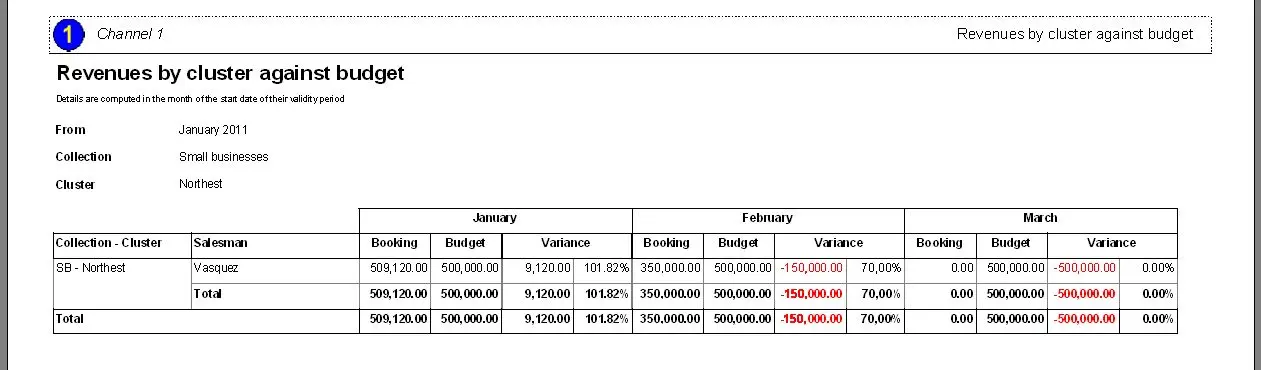 Revenues_by_Cluster_Against_Budget_preview