69.2.4 Settings
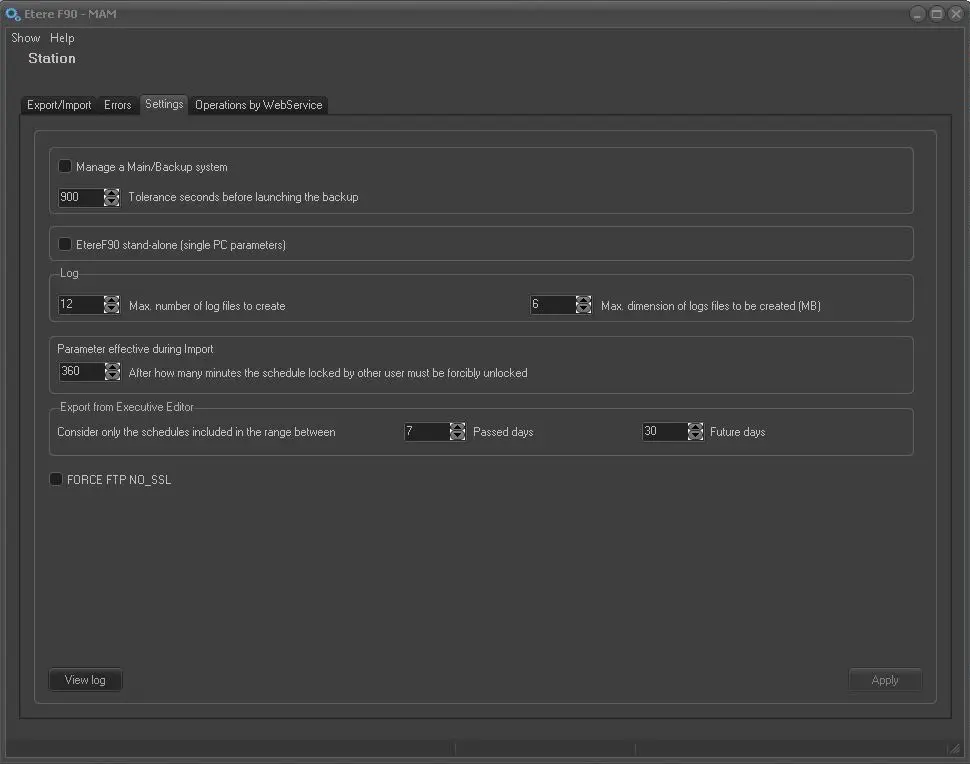
The Settings area allows to specify some parameters related to the Etere F90 application behaviour, these parameters are explained below:
Etere F90 - Settings
Manage Main/Backup System - Enable this option if another instance of Etere F90 is running on another PC (e.g. for redundancy reasons). The Etere F90 instance first started would be Main and the one started later would be Backup.
The "tolerance seconds before launching the backup" parameter (default=900s=15m) allows setting a maximum wait time (between 30s and 9000s) for the main server to give heartbeat communications, if no respond from main server after wait time the backup server would became main server to take charge of all pending import/export operations.
NB: This option is available only if the "standalone" parameter is disabled.
Etere F90 standalone (single PC parameters) - If enabled, all parameters, including selected operations, would be saved only for the current Etere PC, otherwise (if disabled), they would be common for all Etere PC's.
When this option is enabled, you must exit from F90 and relaunch F90 for changes to take effect. This option is useful to bypass F90 initial startup process in local station and start the relevant import instantly to speed up the importing process.
Log - The log file captured the detail information of export and import operations, mainly used for audit and investigation purposes. Each log file can record up to 6 MB of information, a maximum of 12 log files can be generated daily to record the export and import processing information.
Parameter effective during import - After how many minutes the schedule locked by other user must be forcibly unlocked:
•Set a maximum values in minutes, e.g. 360 minutes = 6 hours, to allows the import parameter to be locked by user on other station. The import parameter would be forced unlock after the specified duration.
•If the schedule is locked by user on the same station, the schedule would be automatically unlock during the import process.
Consider only the schedules included in the range between - When automatic export is triggered from Executive Editor (using the “Start F90” feature) you can indicate the number of days from the past and number of days in future in the parameters to include multiple schedule dates when exporting data.
By default, the schedules from the past 7 days and next 30 days would be included in the exported data file.
FORCE FTP NO_SSL - When this option is enabled, it allows to send the F90 exported file to an external server without the standard Secure Sockets Layer (SSL) security feature enabled via the FTP Server.
NB: You need to exercise extreme caution when enabling this option, the data would be transmitted over the network without encryption and there would be no authentication between the FTP server and the browser.
[View Log] - Located in the bottom of the window, the "View Log" allows to display a detailed log of each single operation performed by Etere F90. To search for a specific event simply enter a keyword (e.g. type 'error' for going through all the operations which contains the keyword 'error').
Working modes
Depending on the above configuration, Etere F90 will work in one of the following modes:
Working modes
Shared - Import/export settings would be shared with other network servers of the same station.
NB: Etere systems can have an unlimited number of shared F90 servers.
Parameters:
Standalone:
Main/Backup:
Standalone - Import/export settings would be managed only for the current server. No Main/Backup functioning will be allowed.
NB: Etere systems can have an unlimited number of standalone F90 servers.
Parameters:
Standalone:
Main/Backup:
Main & Backup - One F90 would work as the main server whereas a second one would be the backup server; if the main server doesn't give signals during a user-defined interval the backup server would become main server to take charge of import/export operations.
NB: Etere systems can have at most one Main and one Backup F90 server.
Parameters:
Standalone:
Main/Backup:
 Etere_F90_-_Settings