84.4.4.82 CUSTOM > SCF CSV
Export Scope
The Export Custom SCF CSV export schedule data within a specific date range to a CSV file to be import by receiving party.
The exported CSV file would contain 35 columns of data:
Column # - 1
Column Description : Channel
Column # - 2
Column Description : Genre Transmission
Column # - 3
Column Description : Transmission Title
Column # - 4
Column Description : Original Title Broadcast
Column # - 5
Column Description : Transmission Start Date
Column # - 6
Column Description : Transmission Start Time
Column # - 7
Column Description : Transmission End Time
Column # - 8
Column Description : Transmission Duration
Column # - 9
Column Description : Replication or First Execution
Column # - 10
Column Description : Country of Production
Column # - 11
Column Description : Year of Production
Column # - 12
Column Description : Producer (for ROF only – motion picture work record)
Column # - 13
Column Description : Director (for ROF only – motion picture work record)
Column # - 14
Column Description : Episode Title
Column # - 15
Column Description : Original Episode Title
Column # - 16
Column Description : Episode Progressive Number
Column # - 17
Column Description : Musical Work Title (ROM)
Column # - 18
Column Description : Composer / Author (1)
Column # - 19
Column Description : Composer / Author (2)
Column # - 20
Column Description : Effective Duration of Use (ROM)
Column # - 21
Column Description : Category of use Regional Distribution (if ROF is 4)
Column # - 22
Column Description : Regional Distribution (fixed value = ‘0’)
Column # - 23
Column Description : Registration Title (optional, no value)
Column # - 24
Column Description : Artist or Performer
Column # - 25
Column Description : Phonographic Producer
Column # - 26
Column Description : SCF Label
Column # - 27
Column Description : Date Start Use
Column # - 28
Column Description : Actual Use Time
Column # - 29
Column Description : Music Generation
Column # - 30
Column Description : ISRC (unique international standard recording code for identification of musical phonographic and videography material
Column # - 31
Column Description : Album Title (optional, no value)
Column # - 32
Column Description : Catalogue Number (optional, no value)
Column # - 33
Column Description : Year of Publication (optional, no value)
Column # - 34
Column Description : ISAN (international standard audio-visual number, an ISO code that univocally identifies motion-picture work)
Column # - 35
Column Description : Notes
Column # - 36
Column Description : Asset code
Column # - 37
Column Description : Artist
In the exported file:
•If there are more than one artist or performer, the artist names are separated with a “|” (pipe) character, e.g. “FRANK DAVID | JAMES ALAN | WATSON TONI”
•If the record contains 2 labels, the labels are separated with a “-“ (hyphen) character, e.g. “Universal- Island”.
The export process would adhere to the following criteria:
•The “Transmission title” data field in column 3 must be exported from Media Library
oFlexi-metadata > SIAE > Italian title of the film / seasons
oIf above field is empty, export from SIAE > ROF > Italian title of the film / seasons
oIf above field is empty, export from “descrizio” (Description) field in asset repository table.
•The “Original Transmission title” data field in column 4
oIf data is not found, export from “descrizio” (Description) field in asset repository table.
•The “Phonographic Producer” data field in column 25
oMust be exported from flexi-metadata “SCF_Publisher” field
oIf above field is empty, export from flexi-metadata “SCF_Labels” field
•The “Year of publication” data field in column 33
oMust be exported from Flexi-metadata > audio data > publication date (only export the year)
•The data in “register_siae.generation” data field would be export and converted to the following values:
1. Phonogram
2. Video clips
3. Base
4. Live without base
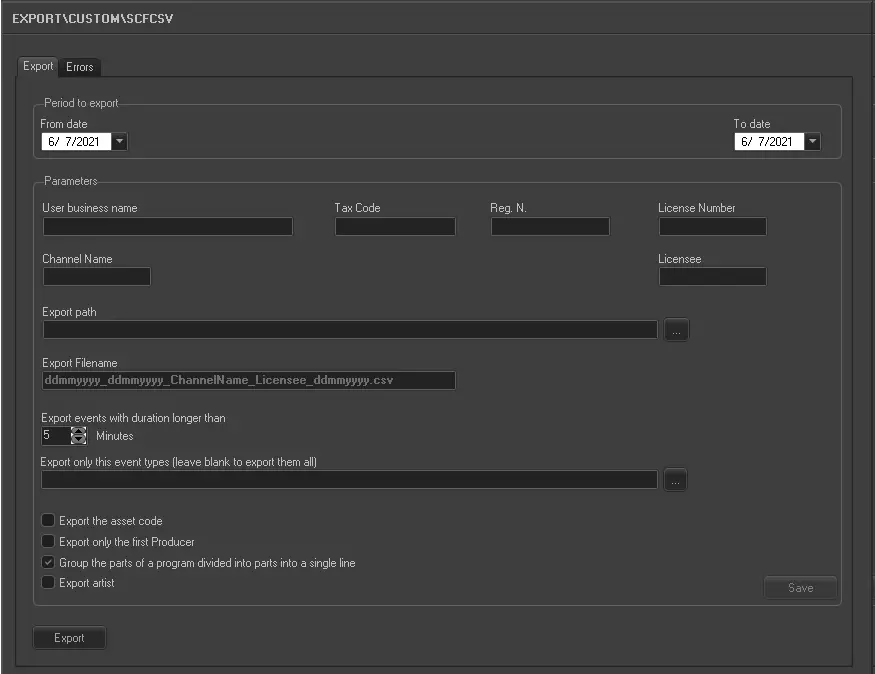
Export Parameters
Export_custom_scf_csv
Period to export
•From date: Specify a date to start exporting the schedules.
•To date: Specify a date to end the export.
Parameters
•User business name: Enter the business name associated with the user.
•Tax code: Enter the tax code associated to the business.
•Reg. N.: Enter the business registration number.
•License Number: Enter the license number associated to the business.
•Channel Name: Specify the channel name used for the export.
•Licensee: Specify the name of the license holder.
•Export path: Indicate the location path where the exported file would be stored.
•Export filename: Enter the exported file name in “ddmmyyyy_ddmmyyyy_ChannelName_Licensee_ddmmyyyy.csv” format, where
•1st “ddmmyyyy” indicate the start date for export.
•2nd “ddmmyyyy” indicate the end date for export.
•3rd “ddmmyyyy” indicate the date the export was executed
•Export events with duration longer than: Only events with duration longer than the specified minutes would be exported.
•Export only this event type (leave blank to export them all): Specify the event types (separated by comma) to be exported. If leave blank, all event types would be exported.
❑Export the asset code: Enable the option to export the asset code, including the parent asset code and asset’s flexi-metadata.
❑Export only the first Producer: If enabled, only the name of the first Producer would be exported.
❑Group the parts of a program divided into parts into a single line: When a program is divided into different blocks in the schedule, enable this option to group various consecutive blocks into single block for exporting.
❑Export artist: Enable this option to include the name of artist in the exported file.
Upon completion, click the <Save> button to save the parameter settings.
Launch the Export
Simply click the <Export> button to start exporting the schedules.
 5191_Export_custom_scf_csv