85.2.4.2 Basic
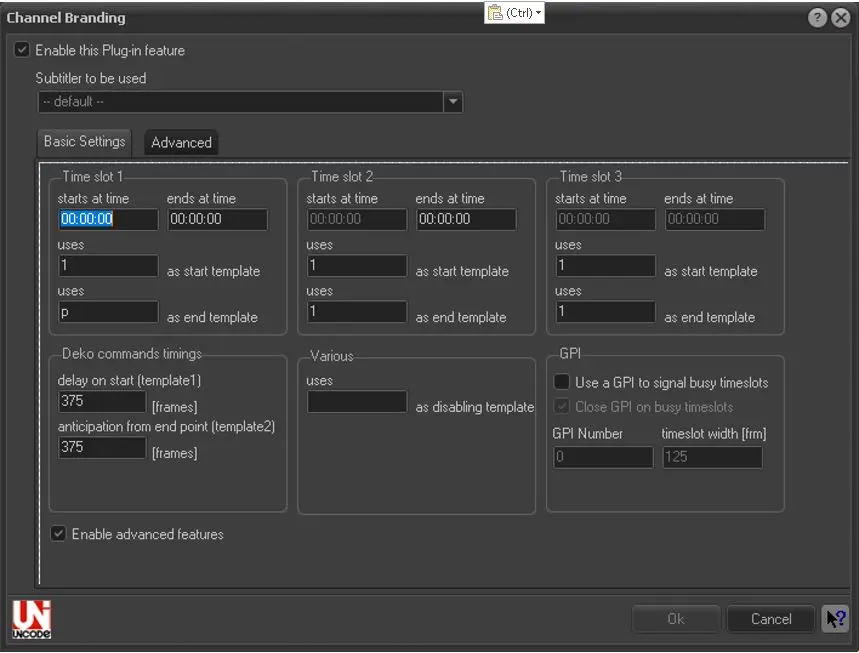
On the main window, the Unicode icon indicates that Etere STMan is able to guarantee that if in the database Unicode graphic titles are written, they will be correctly transmitted to the subtitler. Set under this tab information related to the scripts that will be sent to the subtitler:
Channel Branding
•Subtitler to be used: In case more than one subtitler is configured, select the one to be used for performing the channel branding,
•Time slot 1,2,3: Specify two scripts (.ctm) to launched at the start and end of each (user-defined) time slot,
•Deko commands settings: Specify how many frames after the event's start the starting titling should start, as well as how many frames before the event's end the closing titling will start,
•Miscellaneous: Insert here the script to disable the CTM output, each time STMan detects this scripts it will avoid sending commands to the CG,
•GPI: Set a Gpi to stay opened during the initial and final intervals and closed elsewhere. Indicate how to close the GPI on busy time slots, that is, checked (0=open and 1=closed) or unchecked (1=closed and 0=open),
•Enable advanced features: If enabled, a second tab will be available to allow setting further parameters.
NB: Please note that only for this plugin the script files (.ctm) must reside in Etere directory (usually in c:\program files\Etere); if the same script is already present in Etere Configuration | Settings | Scripts Strings it will be ignored.
 5152_Channel_Branding