T-Workflow Designer
59.3.10.6 Design space - Adding action blocks
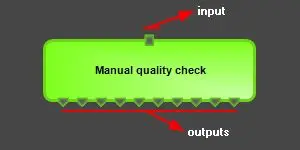
Action blocks can be added to T-workflows by dragging and dropping them into the T-workflow. Once the action is dropped into the Editor section, it is displayed, featuring its visual inputs and outputs:
inputs_and_outputs
•Input: Actions have only one input, represented by a small square.
•Output: Actions can have multiple outputs, represented by a small triangle.
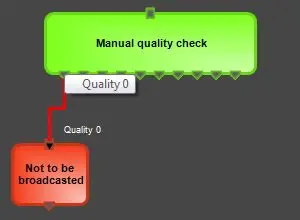
For instance, the figure below shows a "manual quality check" action with one input and ten outputs; each output will be connected to other actions to create a sequence. Connections are inserted by selecting the "connection" tool from the toolbar; once inserted, connections will be displayed along with the output name:
manual_quality_check
 inputs_and_outputs
 manual_quality_check