72.2.1.5 Searching asset - The Search tab
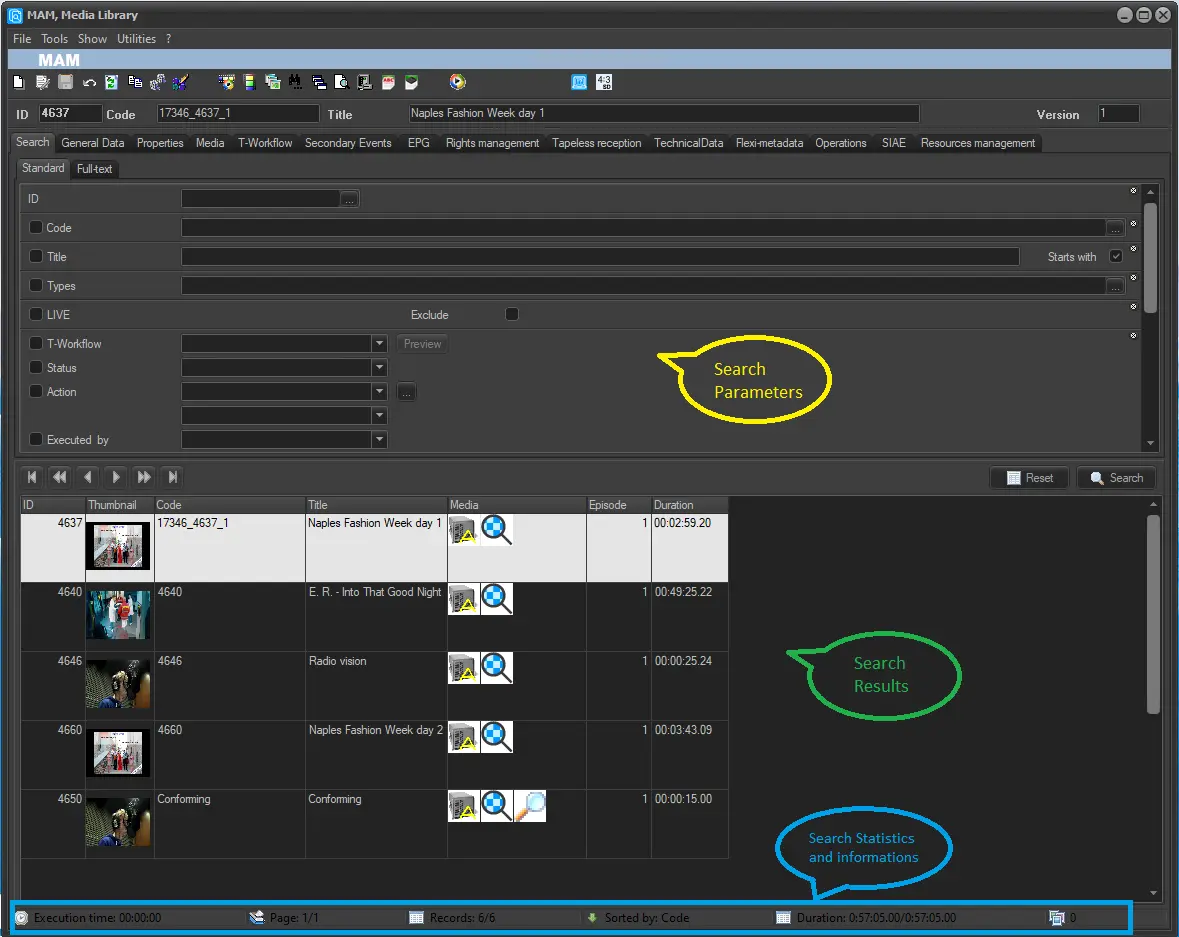
Each time the Media Library module is launched, it opens focused on its search tab, the section permits to retrieve and manage all assets matching specific criteria, this tab has been conveniently divided to allow a better interaction with the user in three key sections:
Search Parameters
This section is distributed in five groups: Standard, Extended, Flags, Full-text and All, where you are able to fully customize your search by specifying how it should be performed (i.e. entering parameters, enabling restrictions, etc).
In the Search Parameters chapter it described how to set the filters so you would increase the accuracy of your searches.
By click on the <Reset> button, it would deselect all previously selected filters / options and clear all search criteria entered in the textbox and return to initial Search pattern.
Search Results
All assets that matched your search parameters would be displayed in this panel, this list may be complemented (if at least one 'grouping' option is enabled) with a 'Groups list' positioned at the bottom left, assets will be sorted according to their types, genres and artists.
Please consult the Search Results for info on direct interaction with retrieved assets.
When searching assets in database, it is advised to adhere to the Regional Settings defined in Etere Ecosystem Pre-installation Checklist to achieve competence results.
Search Statistics and informations
This data provides some statistics on the last performed search like the execution time of the search the number of assets found and the sort criteria.
Note:
The 'searching' features provided by the Etere Media Library module are used by other Etere applications to improve the search, retrieval and selection of assets across the entire system, please refer to the Centralized Assets Selection chapter for more information about this feature.
Average response times
Response times depends on the hardware/software configuration of your SQL Server and the number of records managed in your assets repository. Information on average response times can be found in chapter: "Measuring execution times".
 MAM_Media_Library