72.2.2.74 Operations - Session Logs
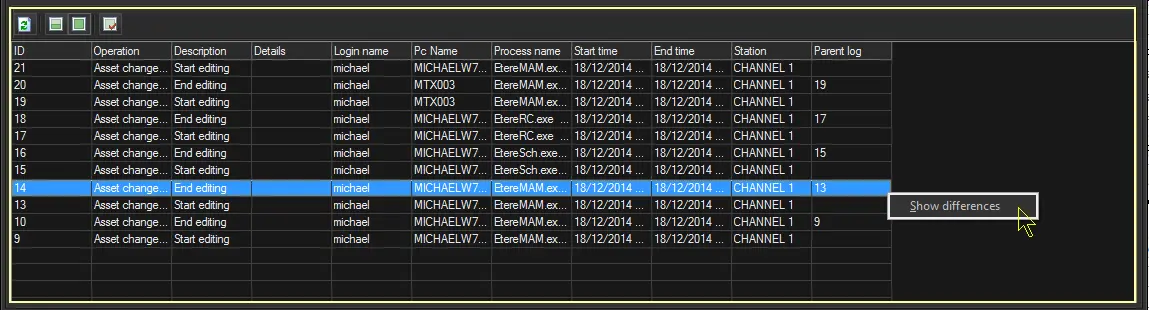
The "Session Logs" panel provides, as its name suggest, detailed information on all changes performed by operators during their session¹ in the Media Library.
¹ : A session starts when the [Edit] button is pressed and ends when the Media Library is closed or another asset is opened.
² : This panel is available only if the "session logs" feature has been enabled for the system.
Session Logs
Columns
ID: Id of the "logged session".
Operation: Kind of logged session (e.g. Asset change from Media Library).
Description: Session action (e.g. start editing, end editing, etc.)
Details: Extra information on the execution of the operation.
Login name: Name of the user who performed the operation.
Pc name: Name of the computer from which the operation was performed.
Process name: Name of the application that performed the operation.
Start time: Date and time at which the operation was started.
End time: Date and time at which the operation was finished.
Station: Station in which the operation was performed.
Parent log: Id of another line related to the same "logged session".
Toolbar
Refresh: Updates the list of operations.
Show last 50 operations: Filters the operations list, displaying only the last 50 performed operations.
Show all operations: Restores the default view options, displaying ALL operations performed for the current asset.
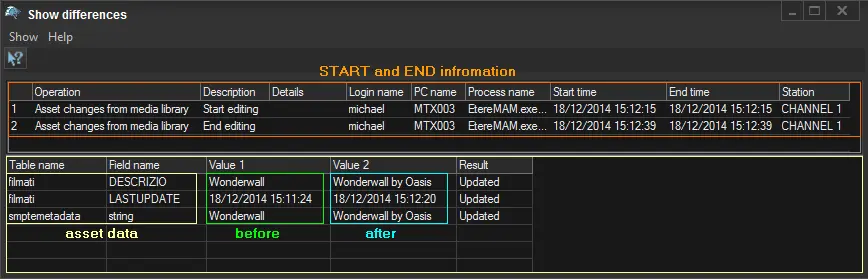
Show differences: Making right-click on a related log (i.e. with a parent log specified), and choosing the "show differences" option will display a small window showing changes performed to the asset, through the following sections:
parent log
Top section - Date and time at which the operation has started and finished, including other relevant data (e.g. operation, login, process, etc.).
Bottom section - Values of modified asset data (i.e. table and field) prior and subsequent to the operation.
 Session_Logs
 parent_log