85.2.15.3 Current/Next Event Setup Wizard
The Current and Next Event Setup Wizards allows to specify the information (i.e.: fields) belonging to either current or next events, that will be sent to a titler specifying along with their start time info:
1.Set the "database fields"
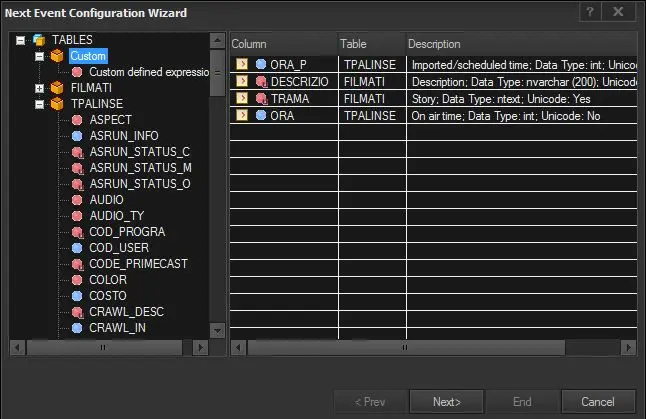
Click on the [Wizard] button, a tree positioned at the left will show custom queries and tables:
Next Event Configuration Wizard
Custom - Insert a custom SQL query that will be used to retrieve a custom collection of fields,
Filmati - This table contains fields related to the assets.
TPalinse - This table holds all properties regarding scheduled assets.
SMPTE - This table offers all SMPTE metadata configured in the system. (available only for "channel branding")
A brief description on each field is available at the bottom of the tree by clicking on a certain item. Moreover, the type of fields is indicated through colors: "blue=numeric", "green=data", "red=text", and "dark-red-icon=unicode":
On the right the list of the fields to send to the titler will be displayed (indicating their column name, table name and description). To add elements to this list it is enough to make double-click on the fields from the left tree. Moreover, making double-click on 'custom defined expression' item, it will be possible to add custom Field (e.g.: f.aspect, t.status, etc).
NB: Fields within the list can be dragged and dropped to order them. The list order is important because it corresponds the values that will be updated in the titler's script file. For intance, the titler should expect that "value1=description", "value2=time", "value3=title", etc.
2. Set the "next event filter"
Press [Next] to define the next event(s) by selecting one of the three available options:
The event is the scheduled one just after the current one - If checked, the "next event(s)" will be chosen by taken the one(s) scheduled immediately after the current event.
Does the next event have the following type? - If checked, the "next event(s)" will be chosen by taking the one(s) matching the selected type.
Use the following custom filter - If enabled, the "next event(s)" will be chosen by applying a custom query. For instance, to filter only events belonging to a certain group of types one can use:
t.newtype in ('ANIM', 'CLIP', 'FILM', 'TVSE')
Number of events to return* - Specify how many "next events" will be displayed among the ones scheduled after the current event and matching the given filter.
Note:
The "number of events to return" parameter is available only for Etere 24.2 or higher versions. In case of using a previous version, returning multiple events is possible by appending /*@nrows=[n]*/ to a "Custom field" or "Database field". For instance, a modified database fields:
f.id_filmati, f.cod_progra, tpalinse.ora/*@nrows=3*/
3.Check the summary
Press [Next] to view (and optionally modify) the previously configured parameters:
Database fields - Data fields to be displayed for next events
Next event filter - Criteria to be applied for filtering events
NB: The aliases used for Etere tables are: T for tpalinse (i.e. playlists), F for filmati (i.e. assets) and P for type (i.e. types).
Once done, press [End] to finish the configuration.
 Next_Event_Configuration_Wizard