201.15.8 Scheduling Grid
In order to automatically schedule music content it is necessary to implement a proper schedule grid enhanced with a music-format differentiation. Follow the steps described below to build a schedule grid structure and define music genres.
1.Block Editor
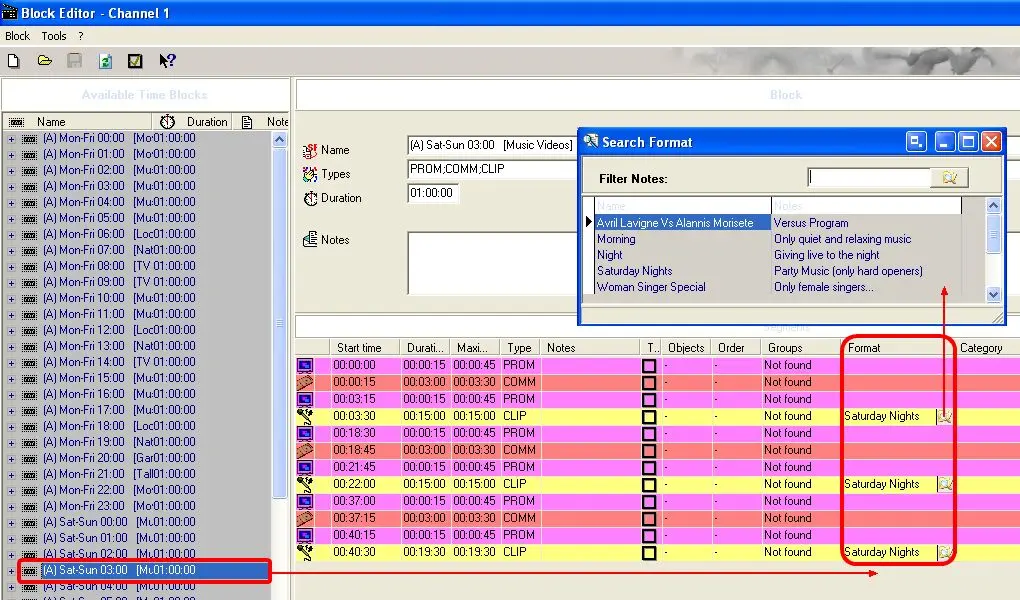
Use the Block Editor application to create program blocks based on a group of segments able to hold various properties including event-type, event-duration, event-format, etc.
Open an existing block or create a new one and define the format used to filter music content. For instance, filter all the assets which type "CLIP" according to the 'Saturday nights' music format.
Musicformat_blockeditor
2.Weekly Schedule
Under Weekly Schedule, build the schedule grid in case it doesn't exists, insert all previously created blocks on the dates and times intended to hold music content.
 Musicformat_blockeditor