54.3.2.1 Fixed Times
The Fixed Time section allows you to schedule an event in all time ranges the user indicates within a specified period. There is no control for a fixed time, which is also true of commercial crowding. To start scheduling a commercial across fixed times, search for it using the [Commercial Code] button and compile the following parameters:
Fixed_Time
Parameter - Commercial Code
Description: Search for the commercial asset to be scheduled
Parameter - From - To
Description: Insert the programming period, by default you will see the start and end date of the order in the order form of the event
Parameter - Order parameters
Description: Retrieves the scheduling parameters from the commercial order related to the asset. It is also possible to modify these parameters to perform more customizable scheduling. Available parameters include:
The order runs - Number of performances expected for the event according to its order.
Scheduled runs - Actual performances of the event across all schedules.
Daily runs - Maximum event performances to be scheduled in a single day.
Time Range - Time interval in which event performances must be scheduled.
Event interval - Minimum gap between two runs of the same event.
Order interval - Minimum gap between two events of the same order.
Customer interval - Minimum gap between two events of the same customer.
Free - Indicates that the performances to be scheduled are free of charge and will not be invoiced.
Product code - Select the product code for the scheduled event.
Check product code - Avoid scheduling events with the same product category in the same time slot (e.g. 20:30:00).
Check first of break - The event will be scheduled as the first one of its time slot (e.g. 20:30:00).
Check last of break - The event will be scheduled as the last one of its time slot (e.g. 20:30:00).
Ignore insertion rules - If enabled, the scheduling process will ignore rules but log any issues encountered into the scheduling report.
Parameter - Priority
Description: Specify the priority with which the commercial asset will be scheduled. An event's priority is the criteria Etere uses to determine its position within a commercial cluster during the scheduling phase. This priority goes from 1 (highest priority) to 1000 (lowest).
Parameter - Scheduled times
Description: Enter the specific times at which the events will be scheduled.
Parameter - Fixed times
Description: Set this parameter to ignore some parameters of the Order of runs and Scheduled Runs sections, thus forcing the scheduling on the selected scheduled times.
Parameter - Days
Description: Select the days for which the event to be scheduled is valid, in which it will be scheduled:
All - On every day of the week, in the period of the dates indicated.
Even - Only on even days (e.g. 2-4-6-8...30) in the chosen period, independently of the day of the week.
Odd - Only on odd days (e.g., 3-5-7-9...31) in the chosen period.
Specific days - Select the weekdays (e.g. Monday and Friday) on which you want the commercial asset to be scheduled.
Once all parameters have been correctly set, press the [RUN] button to proceed with the fixed-scheduling process.
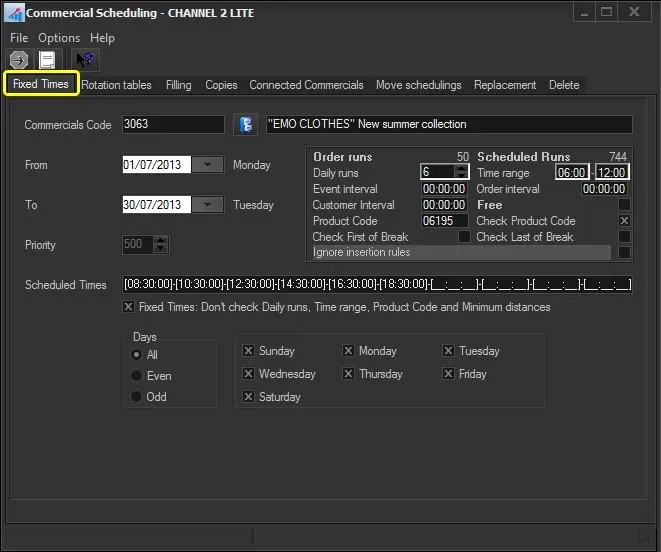 Fixed_Time