79.4.6.4 Rundown Creation Process
In Etere Nunzio, Journalists, Editors and Producers can work on multiple stories together, from the creation of the story content to the on-air process, with multiple tools that allow a complete newsroom workflow.
Once the Rundown has been created, is it possible to manipulate the Rundown in many ways:
- Journalist can works on different stories at the same time, adding text, content, notes/comments, so on and so forth.
- Video Editors can edit videos and manage the videos within Nunzio Stories and Etere MAM.
- Editors can decide the order of certain stories within the Rundown and move Rundown according to their desired needs.
- Producers can discard stories, decide the stories order in a given Rundown, float stories on the fly even during the On-Air process of the Rundown.
Following, most of the Etere Nunzio Rundown functionality:
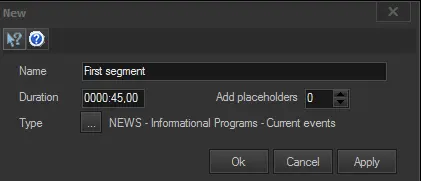
- Append segment: Insert a new segment at the end the rundown, specifying the following information:
4784_Append_segment
- Name: Enter a brief descriptive name for the segment
- Duration: Specify the on-air scheduled duration of the segment.
- Type: Indicate the type of the segment.
- Add placeholder: Select the number of place holders to be created within the segment.
- Insert segment here: Add a segment immediately before the currently selected segment. The program would automatically create a 2-frames segment in the Rundown.
- Append placeholder: Insert a new placeholder at the end the rundown.
- Insert placeholder here: Add a placeholder immediately before the currently selected placeholder/story.
- Insert story - [INS]: Browse the Media Library and select an asset to be inserted within the selected segment.
WARNING: Only assets belonging to the NZST type (Nunzio Story) are available for insertion.
- Edit - [CTRL - E]: Load the selected story into the Stories Management for view and editing.
- Replace: Replace the selected story with a new asset selected from the Media Library.
NB: As per insertion, only assets belonging to the NZST type are available for replacement.
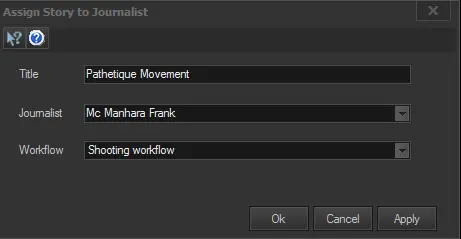
- Assign to: Assign (or change the assignment of) the selected story to a specific journalist indicating a T-workflow to be immediately launched for the story asset:
4788_Assign_to
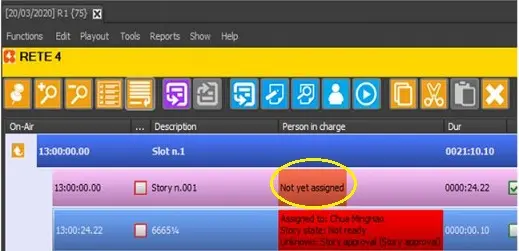
If the Story is not assigned to any Journalist (leave the “Journalist” parameter as blank) during the creation of Story, the Story would be indicated as “Not yet assigned” under the “Personal in charge” column.
4789_Not_yet_assigned
WARNING: This function is available only for placeholders and stories (not segments) featured within regular rundowns (not rundown templates).
- New version: When copy a story from rundown, select this option to create a same story with a new version.
- Task - [CTRL - C]: Open the task assigned to the current user for the selected story.
- Lowres Preview: If available, load the proxy preview of the selected story in the Preview panel.
WARNING: The preview panel is based on the Proxy Preview module.
- Video input: Select the router channel from which video is transmitted.
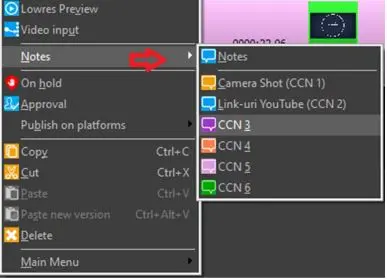
- Notes: Input additional information related to the event in rundown, e.g. if “Live” is inserted, you can enter the name and contact numbers of the staff members working on the field for reference purposes.
Beside “Notes” field, you can also manage other Settings inserted in Rundown Editor.
4786_Notes
NB: This function is only available if the access rights “Functions\Nunzio\Rundown\Story\Notes” is set to “Allowed” in Etere Rights Management.
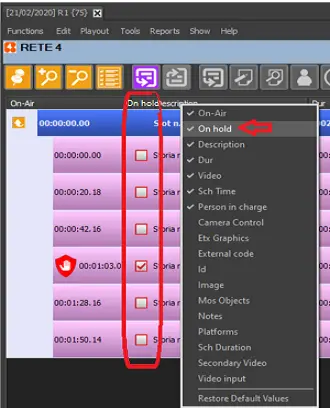
- On hold: You can put the story on-air, or put it on-hold. In the On Hold column, there is a checkbox for each row that contains a story, you can enable (checked) the checkbox to put the story on-hold, or disable (unchecked) the checkbox to put the story on-air.
4785_On_hold
You should avoid editing the same story in another Nunzio instance, else the on-hold status could revert to previous status if you are using a lower version of Nunzio.
WARNING: The “On hold” function is only available if the access rights in “Functions\Nunzio\Rundown\Story\On hold” is set to “Allowed” in Etere Rights Management.
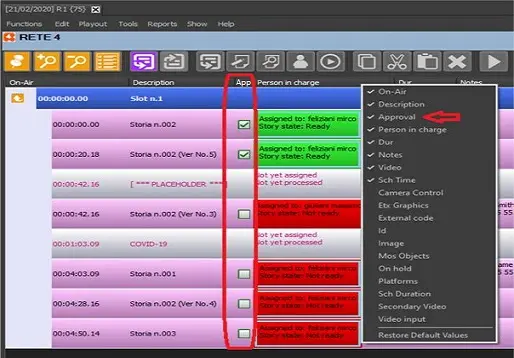
- Approval: The Approval function allows the executive producers to approve a story without checking the video or the text. In the Approval column, there is checkbox on each row that contain a story, the executive producers can approve the story by simply enable the checkbox in Rundown Editor.
4787_Approval
WARNING: The “Approval” function is only available if the access rights in “Functions\Nunzio\Rundown\Story\Approval” is set to “Allowed” in Etere Rights Management.
- Assign to manual player: Load the selected story in a manual player selected among the available ones.
- Copy - [CTRL - C]: Put the selected story in the clipboard.
- Cut - [CTRL - X]: Put the selected story in the clipboard and remove it from the Rundown.
- Paste - [CTRL - V]: Paste a copied/cut story in the current Rundown position.
If a story is copied into another Rundown or to a different station using the copy/cut-and-paste function or drag-and-drop function, a dialogue box would popup for user selection, you must choose to copy the story or create a new version of the story.
- Paste New Version - [CTRL - ALT - V]: Paste a copied story into a placeholder. This will replace the placeholder with the copied version.
- Delete: Remove the selected story from the Rundown.
- Main menu: Give quick access to the Rundown's main menu functions.
- Double-click: Depending on whether you double-click on a story or a placeholder you can:
- ▪Story: Load the story into the story editor.
- ▪Placeholder: Open the Etere story creator form to create a new story (from scratch or template), assign a journalist for its preparing and select a T-workflow for its management. Once created, the new story is loaded into the story editor.
WARNING: If the changes made in Rundown is beyond midnight, the changes would be updated into current date Rundown.
Right-click any column header to open the contextual menu.
The first section lists the columns available for display by default:
On-Air
Description
Dur
Video
Sch Time
Person in Charge
Approval
MOS Objects
Notes
On Hold
Row Number
Sch Duration
Video Input
The second section includes:
Restore Default Values
All Columns...
Restore Default Values resets the rundown to its default configuration. After selecting this option, only the following columns will be displayed: On-Air, Description, Dur, Video, Sch Time, and Person in Charge.
All Columns... opens the Columns panel, which shows all available rundown columns, including hidden ones, as a list of checkboxes. Select a checkbox to enable the corresponding column.
On the right side of the Columns panel, use the up and down arrows to change column order. Columns can be reordered even if they are currently disabled.
In addition to the default entries, the Columns panel also includes the following options:
Audience Advisory
Camera Control
Category
Etx Graphics
External Code
Flexi-Metadata
Id
Image
Platforms
Secondary Video
Talk Duration
Talk Duration 2
Talk Duration 3
 Append_segment
 Assign_to
 Not_yet_assigned
 Approval
 Notes
Notes
 On_hold