59.3.4.8 Shopping Cart Settings - Configuration
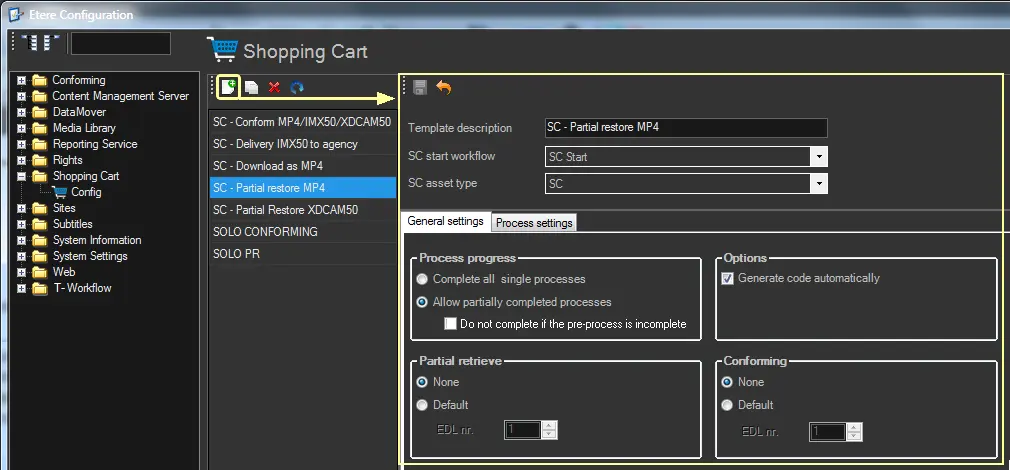
The "Config" section, available in Etere Configuration, allows configuring an unlimited number of job templates to be made available to users, specifying all their required data (i.e. composing processes, triggered T-workflows, execution behaviour, etc.). To create a new template, press the SC_Settings_icon_new New button and configure the following parameters:
Shopping_Cart_Configuration
Primary information (parameters related to the job execution)
Parameter: Template description
Description: Brief descriptive template name (e.g. SC Download MP4, SC Download MOV, SC Delivery to Astro, etc.).
Parameter: SC Start T-Workflow
Description: T-Workflow to be launched to trigger the shopping cart processing.
Note: Only T-workflows containing a "Shopping Cart start" action will be listed.
Parameter: SC Asset Type
Description: Select the asset type for "Shopping Cart" assets.
Note: Only types with the "SC" property enabled will be listed.
Default T-workflow options (set default parameters for pre-processing)
Parameter: Process progress
Description: Specify if processes must be managed either in groups or individually:
Complete all single processes - A process is automatically started for all assets if the previous process is completed for all assets in a ticket.
Allow partially completed processes - A process is automatically started for an asset after completing the previous process for the said asset (other assets can be incomplete).
Moreover, this option allows specifying the following criteria:
Do not complete if the pre-process is incomplete - If disabled (default), processes will be executed independently from the pre-process.
If enabled, no process will be executed if the pre-process (conforming or partial retrieve) wasn't completed or returned with an error.
Note: Pre-processes (i.e. conforming and partial restore) are always managed in the group; the first process is started only after all pre-processes are completed for all assets in a ticket.
Parameter: Options
Description: Indicate how to create the code of new tickets:
Automatically - If checked, the code of Shopping Cart tickets will be automatically created based on the code generation policies.
Manually - If checked, the user will manually enter the code of Shopping Cart tickets during the creation phase.
Parameter: Partial retrieve
Description: Specify the EDL version to be used by default for partial retrieval.
Parameter: Conforming
Description: Specify the EDL version to be used by default for conforming.
Process settings (add and configure all processes to be sequentially performed as part of the Shopping Cart job)
Parameter: Process description
Description: Select the flexi-metadata that defines the process scope (e.g. Censorship, Transcoding, Delivery, etc.).
Note: It displayed only the flexi-metadata associated with the asset type (e.g. SC) selected in the SC Asset Type parameter.
Parameter: T-Workflow to trigger
Description: Define the behaviour of the Shopping Cart job:
Process - Select the T-workflow to be triggered to perform the process (e.g. censorship) for all assets included in a ticket.
¹: Process T-workflows must contain a Shopping Cart action (e.g. completed).
²: Sub-clips can be created through either a "partial retrieve" or "conforming".
Only conforming pre-process - Select this option ONLY if a conforming is required for the Shopping Cart.
¹: None of the other processes in the Shopping Cart will be performed.
²: Sub-clips can be created only through "conforming".
Only partial restore pre-process - Select this option if ONLY a partial restore is required for the Shopping Cart.
¹: None of the other processes in the Shopping Cart will be performed.
²: Sub-clips can be created only through a "partial retrieve".
Note: The conforming and partial restore pre-processes are performed using the related workflows set in "Etere Configuration > Conf. Editor > T-Workflow > Default T-workflows". For more info on Processing modes, click here.
Note:
The progress status of processes is automatically updated based on the frequency-time set for the SQL Server Agent.
 Shopping_Cart_Configuration