69.2.3 Configure Import
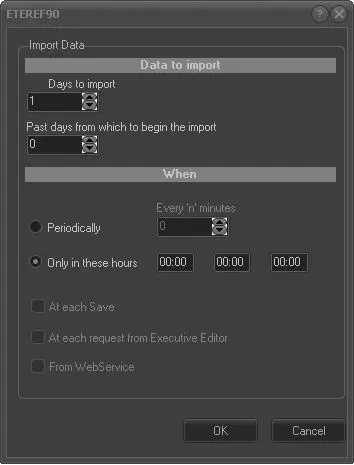
The "Import data" section allows you to specify the frequency at which an import function is executed (i.e., checks if there are new files to be imported), with an option to import from Web Services. The parameters set are unique for each import function.
Parameters available in this form include:
Import data
Data to import
Days to import - Enter the number of days to import (e.g. three days).
Past days from which to begin the import - Enter the number of past days to start importing data (e.g. from 3 days ago onwards).
For instance, if today is 20/08/2012 and you set "days passed..." to 3 and "days to import" to 2, data will be imported from 17/08/2012 to 18/08/2012.
NB: Leave this to "0" to import data usually, that is, from the current date onwards.
NB: The above parameters are not available for the following standard imports: APPLE FCP IMPORT XML, XML ASSETS FULL, XSLT ASSETS FULL, ASSET DOMA, SCHEDULED INGEST XML, XSLT ASSETS FULL BIS, SUBTITLES ASSET.
When
Periodically - Automatically performs the import within a specific frequency (in minutes).
Only in these hours - Set up to three fixed timings to perform the import.
From WebService - Allow the import of XML to be handled by Web Services. With this option checked, there is a 10-second interval for import to search for data in the queue.
Note:
In former Etere versions, periodical imports/exports were managed through a global parameter; when upgrading a system to a newer version (22.5 or higher), each function will be set with either the global frequency (if selected) or the default frequency (1 minute).
 Import_data