59.2.27 Taskbar Displayed Title
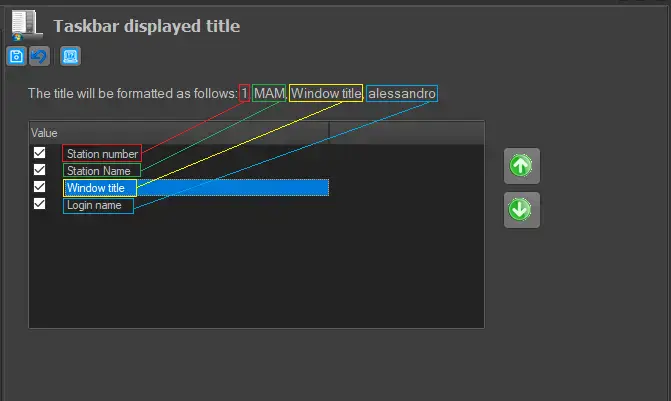
The Taskbar Displayed Title section allows determining the information to be displayed in the taskbar and channel bar of Etere modules. The displayed information can be set up by enabling/disabling the following fields:
Taskbar_Displayed_Title
Station number: The progressive number related to the station where the module has been launched.
AVAILABILITY: Taskbar - Yes Channel bar - Yes
Station name: The station's name where the module has been launched.
AVAILABILITY: Taskbar - Yes Channel bar - Yes
Windows title: The name of the Etere module (e.g. Scheduling, Configuration, etc.) to which the window is related.
AVAILABILITY: Taskbar - Yes Channel bar - No
Login name: The login name (e.g. usrweb03, Thomas, Luca, etc.) of the application has been launched.
AVAILABILITY: Taskbar - Yes Channel bar - Yes
The position of the displayed fields can be changed by moving them up or down using the arrow key buttons.
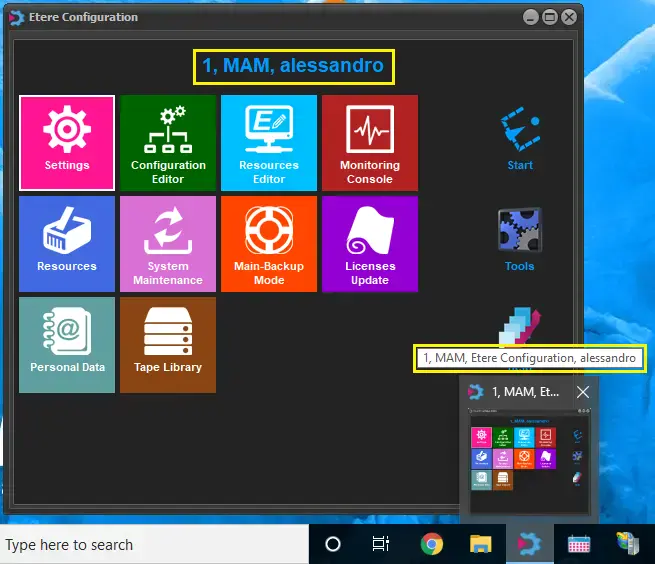
Upon changes, press the "save" button to save the settings and restart Etere modules for changes to take effect:
save_changes
 Taskbar_Displayed_Title
 save_changes