59.2.16.5 Barcode Format
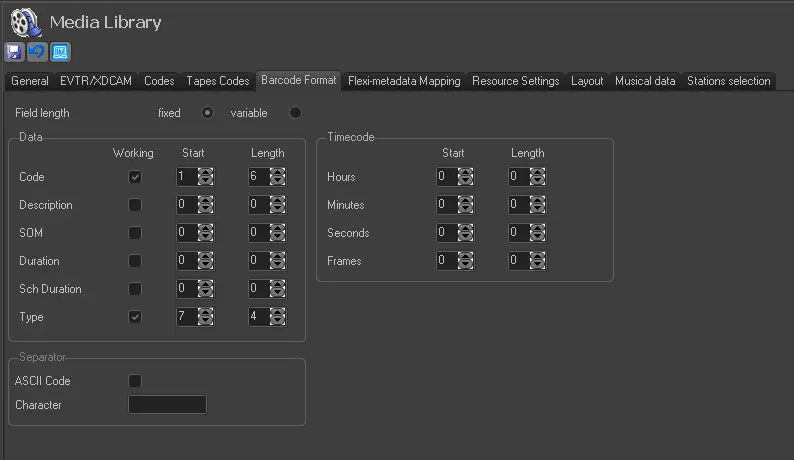
The Barcodes format section allows you to configure the barcode format so that when a barcode reader is used, the program knows (based on the parameters defined here) how to recognise the format of the barcode. Available parameters include:
Field length
Specify if the length of data and timecode fields should be fixed or variable:
•Fixed: If enabled, the operator will be able to specify the date and time code positions in the barcode string.
•Variable: The data will always be present in the same position if enabled.
Data
Activate all data that the barcode holds by unchecking the 'working' parameters, then specify the "start' column and the 'length' column to define the number of characters in the data.
•Working: Enable this flag to indicate that a field (i.e. code, description, SOM, duration, expected duration or type) is present in the barcode.
•Start: Specify the position of the first character to start defining the data.
•Length: This parameter (available only for fixed field lengths) sets the number of characters that a field (i.e. code, description, SOM, duration, expected duration or type) occupies.
Timecode
Specify the "Start" and "Length" strings that represent the timecode (e.g. hh:mm:ss:ff):
•Start: Set the position of the first character of the field (i.e. hours, minutes, seconds or frames) in the string that represents the timecode.
•Length: Set the number of numeric characters in the field (i.e. hours, minutes, seconds or frames).
Separator
To separate one data field from another, specify the field separator to be used (e.g., /, --, \, _ ):
•ASCII code: If selected, indicate in the field below the character's ASCII code to be used as a separator.
•Character: If the ASCII code parameter is disabled, insert the custom string here as a separator; otherwise (ASCII code is enabled), insert the character's ASCII code to be used as a separator.
Sample of use
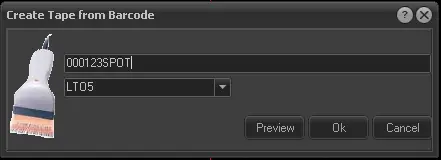
For instance, each time the operator uses the 'create tape from barcode' function from Media Library, the tape data will be automatically retrieved from the barcode based on the parameters set in Etere Configuration:
Barcode format
Create tape from the barcode
 Barcode_format
 Create_tape_from_barcode