84.4.5.5 STANDARD > DALET RUNDOWN XML
Import Scope
The Import Standard DALET RUNDOWN XML import an XML file containing playlists into Etere Studio Player.
The import process would update the following Studio Player tables in Etere Database:
•Studio_playlist
•Studio_items
•Studio_history
Upon import, the new asset is created as per Etere specifications. If asset exist in database, the database asset would be replaced.
The following checking mechanism applied before importing the XML file:
- The XML file format and structure are valid
- There is at least 1 row of data in the file.
- If the file format or data is incorrect, the import would be terminated with error message.
- If the import file name is without extension it would be taken as playlist name.
- If the data in the Tag is longer than 32 characters it would be taken as Asset Code.
- If the data in the Tag is less than 32 characters the asset would be created based on automatic code
- if the file is wrong it is renamed to .err so as not to reprocess it.
management rules defined in Media Library.
Import Parameters
The following parameters are required to fulfill the import process:
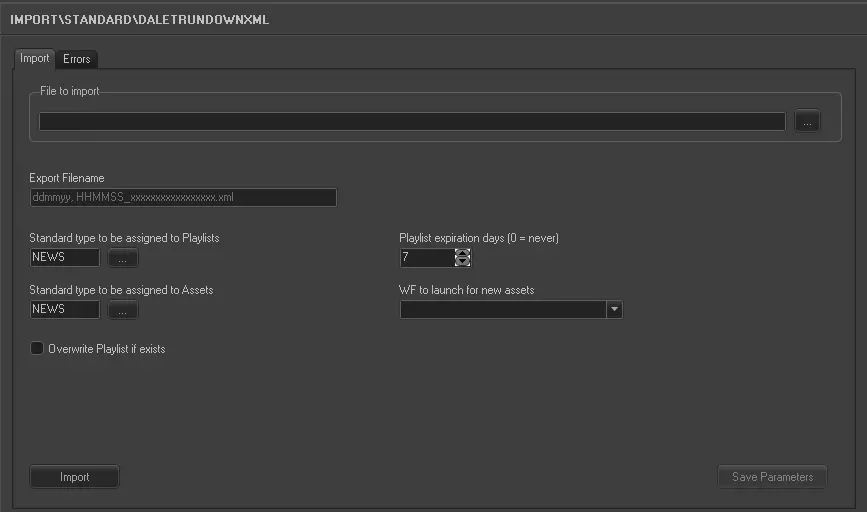
Import_standard_dalet_rundown_xml
•File to import: Specify the path where the XML file to be import is stored. You can use the browse button to locate the XML file in local or network drive.
•Export filename: The exported filename format is “HH:MM:SS_xxxxxxxxxxxxxxx.xml”, e.g. “07:45:13_WORLD-NEWS_Studio-3.xml”.
•Standard type to be attributed to the playlists: Select one of the Etere type to be associated to the imported playlists in Studio Player.
•Standard type to be attributed to Etere Assets: Select one of the Etere type to be associated to the imported playlists assets.
•Playlist expiration days: Set the expiry days for the import playlist. Or set to “0” where no expiry date would be applied.
At the end of each import, the old imported file would be deleted from system based on the date in imported filename against the validity date set in this parameter.
•Workflow to be launched when creating an asset: Select one workflow to be triggered when asset is created in database.
❑Overwrite Playlist if exists: When re-importing XML file with the same filename, enable this option to overwrite the existing playlist in database with a new playlist. If this option is disabled, XML file with same filename would not be imported.
NB: With this option enabled during import, the playlist would be locked and must be closed from Studio Player.
When all parameters are set, click the <Save> button to confirm the settings.
Launch the import
Simply click the <Import> button to start importing data from the XML file into database.
 5203_Import_standard_dalet_rundown_xml