72.13.2.3 Completing Worksheets
In case the worksheet has been already assigned or if it doesn't require being assigned (because not set as "to assign"), it will be possible to proceed with the completion of the worksheet from the following modules:
From the Media Library
All running worksheets attached to assets can be searched by operators from the Media Library module, more specifically, using the 'worksheet' and the 'job status' search filters:
Job status
Once found, the operator opens the asset form for which the work order will be compiled, then, navigates to the worksheet tab and compiles the worksheet:
Worksheet tab
NB: Please note that only those operators which count with rights over the "worksheet" action will be allowed to compile the worksheet.
Please note that tasks information can be saved even without setting a result, thus making them available the next time the task is loaded.
From the Agenda
In case the worksheet action has been set for "automatic assignment" it will be assigned to an assignee (either directly or based on a group/role), the worksheet will become available under the assignee's Agenda View. From that module it will be possible to consult and also undertake and compile the worksheet (listed under the Agenda's tasks):
Agenda's tasks
Note
Whether the operator uses the Agenda View or the Media Library for completing worksheets, in case the worksheet is set to require a password to confirm the task result, the operator will be asked to enter its password (the same set in its personal data) in order to proceed:
mam_worksheet
The password confirmation regards only the result, in case no password is provided or a wrong one is entered, all data -but the result- will be saved.
 Job_status
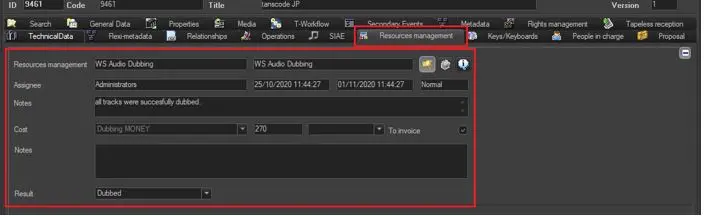 Worksheet_tab
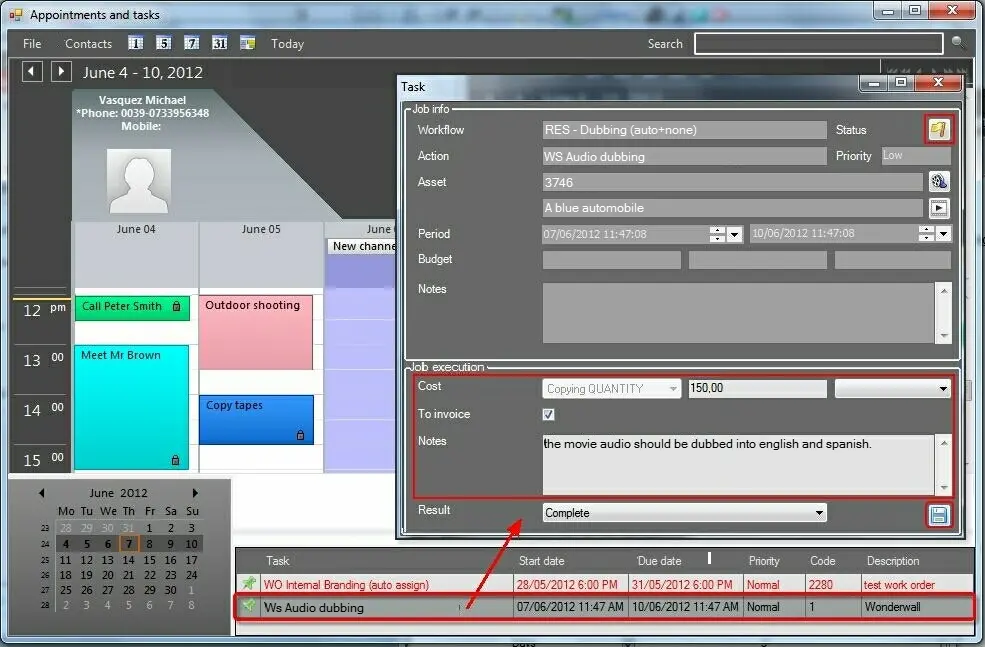 Agenda's_tasks
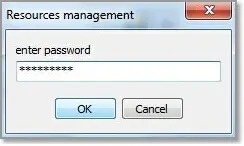 mam_worksheet