208.2.2.1 Low UDP packet buffering
This error (FastSentDatagram) arises when the "server does not use all bandwidth available" as required by the FTP server.
Automatic Solution 1. Launch the Update Workstation module to correct the windows registry setting for all the parameters required for transfer function.
OR
Manual Solution 1. Start "Registry Editor" (Regedt32.exe)
2. Locate the following key in the registry: "HKLocalMachine\System\CurrentControlSet\Services\Afd\Parameters"
3. On the "Edit" menu, click "Add" Value, and add the following registry value:
Ftp_commonissues01
Value Name - FastSendDatagramThreshold
Data Type - REG_DWORD
Value - 2048 (*)
(*) The "value" is the threshold (in bytes) at which Winsock changes its behavior regarding UDP packets. The value must be between 1500 and 2048 (decimal) to increase the amount of usable bandwidth. (source: http://support.microsoft.com/kb/235257).
4. Save and exit Registry Editor.
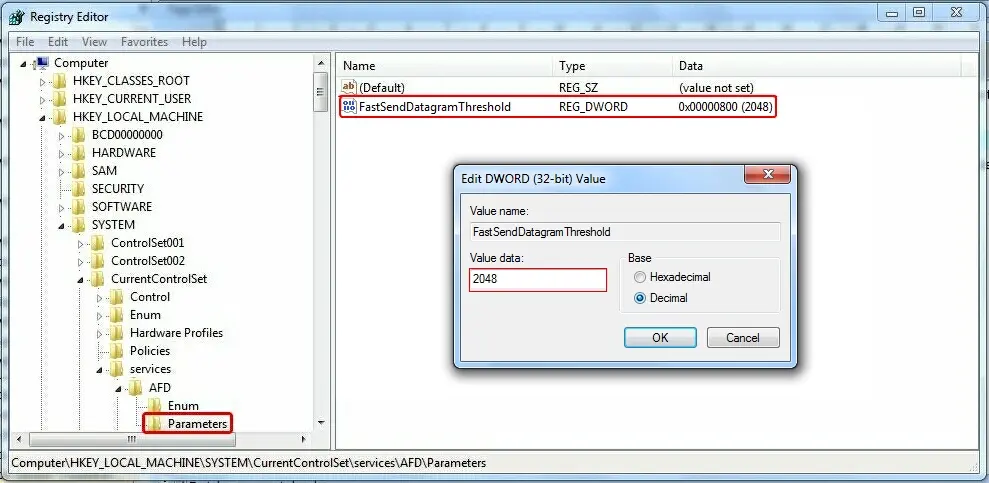 Ftp_commonissues01