84.4.4.5 STANDARD > CISCO > EPG ROSA XML
Export Scope
The CISCO ROSA export creates an .XML file containing the on-air schedule of one or more days. As it names indicates, this export has been developed to provide the Cisco Rosa Service Information with an 'understandable' file from which retrieve EPG information such as event schedule descriptions, and other event-related topics in a television network.
Export parameters
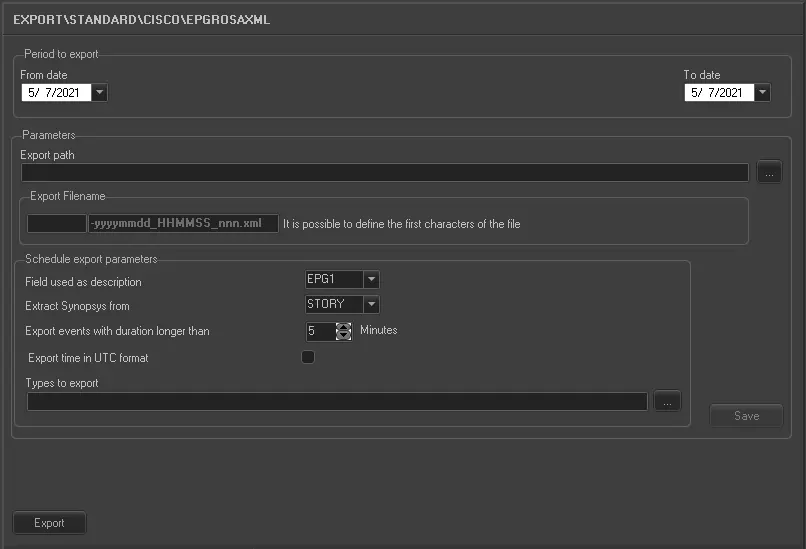
This export allows the following parameters to be set:
5066_Export_standard_epg_cisco_rosa_xml
•Period to export (from date - to date): Indicate the date range on which the schedules to be exported are contained,
•Export path: Indicate the path to the directory on which the exported files will be stored once generated,
•Export Filename: A single .XML file will be exported, it will be named based on a specific format (xxxxxxxxxxxx-yyyymmdd_HHMMSS_nnn.xml), where:
- xxxxxxxxxxxx: Prefix characters defined by the user,
- yyyymmdd: The export year, month and day,
- HHMMSS: The export hour, minutes and seconds,
- nnn: A progressive number (from 000 to 999).
•Field used as Description: It simply allows to select the assets table field to be used for the description of scheduled events. Possible fields are:
- EPG1 : it will use the field FILMATI.DESCRIZIO_1 from the Etere's database.
- EPG2 : it will use the field FILMATI.DESCRIZIO_2 from the Etere's database.
- STORY : it will use the field FILMATI.TRAMA from the Etere's database.
•Extract synopsis from: It simply allows to select the assets table field to be used for the synopsis of scheduled events. Possible fields are:
- EPG1 : it will use the field FILMATI.DESCRIZIO_1 from the Etere's database.
- EPG2 : it will use the field FILMATI.DESCRIZIO_2 from the Etere's database.
- STORY : it will use the field FILMATI.TRAMA from the Etere's database.
•Export events with a duration longer than: This parameter permits to export only those events which duration is longer than the value specified here, ignoring events with shorter durations.
•Export time in UTC format: Enable this option to export the scheduling time in Coordinated Universal Time (hh:mm:ss) format.
•Types to export: Select the asset types to be exported to the XML file.
Launch the export
Once all parameters have been correctly set, just press the <Export> button to launch the export operation.
 5066_Export_standard_epg_cisco_rosa_xml