84.2.2 EE Menus
Available menus
All features available in the Executive Editor application to provide easy identification of the scheduling features have been organized across the following menus:
Schedule
Functions
Edit
Tools
Ad Insertion
Air Sales
Show
NB: If the opened schedule is locked by a different user, the most important menus and functions won't be available.
Menu shortcuts
The toolbar positioned between the main menu and the schedule grid can hold a custom arrangement composed of items from the menus mentioned above, including:
4850_Toolbar
Open - Open a specific schedule through a user-friendly interface.
Publish - Sends the current schedule to the automation(s) servers for airing.
Auto-publish - Enables the automatic publication of the schedule at each change.
Sync playlist - Enables the simultaneous management of multiple station schedules.
Refresh - Updates the schedule (e.g. simultaneously modified by different users).
Media Library - Open the asset related to the scheduled event in the Media Library.
NB: Please refer to the SCHEDULE options chapter for detailed information on the above functions.
Customize columns - Customize the visualization of schedules (e.g. font, background icon size, etc.).
For detailed information on this function, please refer to the Columns chapter.
The toolbar can be customized by right-clicking it and selecting the "customize" option. A small window will be opened, allowing you to choose the items (e.g. most commonly used functions) intended to be displayed as toolbar shortcuts.
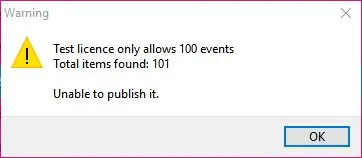
* NB: If the workstation carried a "Test" license, the maximum number of events allowed to be published is 100. If you attempt to post events that exceed the limitations, a warning message will be prompted, and the published action will be denied.
4849_Test_license
 Toolbar
 Test_license