59.4.16.1 Dragon Agent Configuration
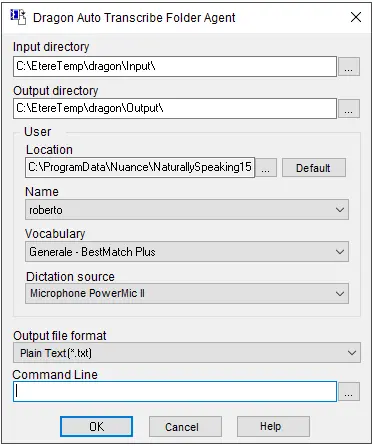
After the Dragon Transcript application has been installed, you must configure the Dragon Agent for automatic file transcription.
Dragon_Transcript
Parameter: Input directory
Description: Specify the directory where the audio file is located. Only a local path is acceptable.
Parameter: Output directory
Description: Specify the directory path to store the transcribed file. Only local path is acceptable.
Parameter: Location
Description: Indicate the user path where the application would be activated. You can click the <Default> button to use the default user path.
Parameter: Name
Description: The user name of the current login user.
Parameter: Vocabulary
Description: Select the vocabulary level to achieve a better transcription.
Parameter: Dictation source
Description: Select the dictation device or any supported built-in microphone to be used in the transcription process.
Parameter: Output file format
Description: Select the output file format for the transcribed file, e.g. plain text file format, Microsoft Word, Notepad, etc.
Parameter: Command line
Description: You can use custom commands to frequently insert text, automate tedious tasks or multi-step processes, etc.
When all parameters are fulfilled, click the <OK> button to confirm the settings.
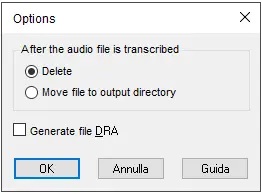
Next, you can delete or retain the source audio file upon successful transcription by selecting the option.
delete
Enable the "Generate file DRA" option to create the Dragon Recorded Audio (DRA) files. Dragon automatically saves audio and text transcripts of the dictation in the DRA files by default. The DRA files can be used when viewing or editing dictated text in the programs or performing playback on some text to hear exactly what was dictated.
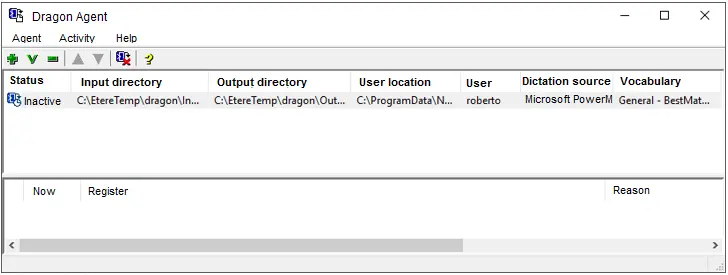
When the Dragon Agent application is activated, the configured settings are present.
Dragon_Agent
 Dragon_Transcript
 delete
 Dragon_Agent