51.1.1.1 Main/Backup mode
The main/backup mode allows two instances of Etere ActiveSync to run on different computers to increase the redundancy of the synchronization process, making the backup system capable of replacing the main one if it stops running.
The main/backup mode is enabled through the "Manage a Main/Backup system" parameter. The tolerance for using the backup server is set through the "tolerance seconds before launching the backup" parameter.
To use Etere ActiveSync in main/backup mode, start the first server and then start the second one. The first server would become the Main server, whereas the second server became the backup server. The "MAIN" displayed in the "Main/Backup" window in the "Synchronization" tab indicates that the Main server is in "Running" status:
Synchronization
The backup server is running in standby mode (i.e. without processing files). It constantly checks if the main server is in "Running" status and can replace the main server immediately if the main server is down. As for the main server, the "backup" status will be indicated at the bottom of the screen. A progress bar would show the time remaining for the next check:
Backup
Note: The main/backup mode is intended to work with two ActiveSync servers. Therefore, more instances of ActiveSync must not be executed.
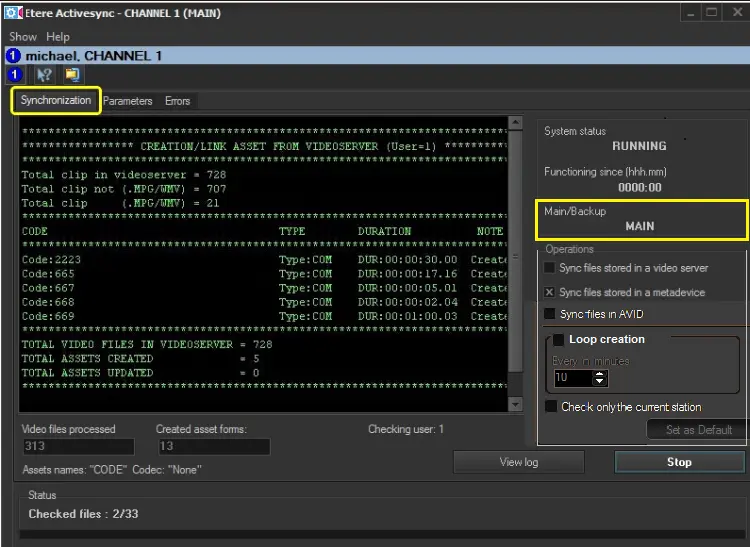 Synchronization
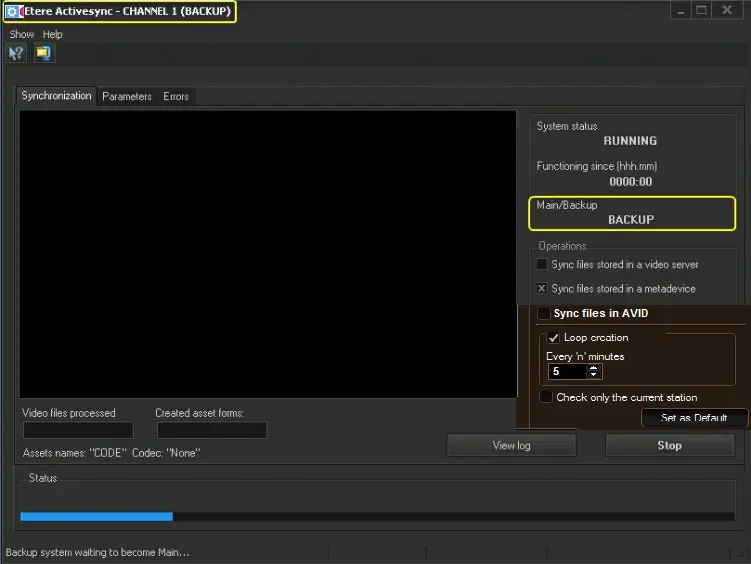 Backup