59.3.9.96 Set current site
Action Description
The "Set current site" action allows to set the reference site (e.g. an Etere system located at Sidney) of a T-workflow instance, this information will allow performing operations (e.g. Remote Workflow Action (linked server) specifically in that site.
Note
Setting the current site is needed by remote workflow actions based on linked servers as it specifies the target to be synchronized/updated.
For further information please refer to "Action blocks > Copy" and "Federate management > Implementing T-workflow" chapters.
Action Parameters
To create this action, just complete the following data:
General info
Name - Enter a self-descriptive name for the action (e.g. Set current site to "MyTv@Sidney")
Select site - Specify here the site (e.g. MyTV@Sidney, MyTV@Miami, etc.) to be used as reference
Depending on the success of the requested operation, one of the following results will be returned by the action:
The site successfully set (site successfully set)
Site not found (site doesn't exist in the list of configured sites)
How to use it
To set a reference site (e.g. MyTv@Sidney), it is first required to include the "Set current site" action into a T-workflow using the T-Workflow Designer:
Set_current_site_action_into_a_T-workflow
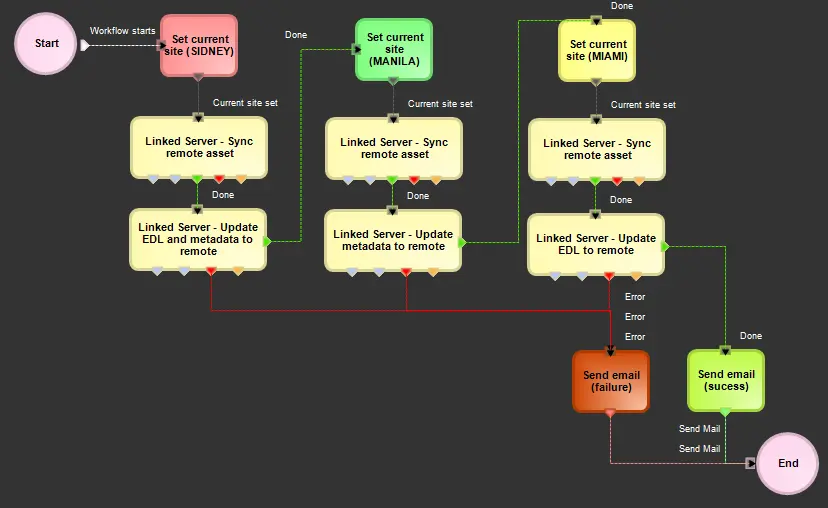 Set_current_site_action_into_a_T-workflow