84.4.4.65 CUSTOM > DRM CSV
Export Scope
The DRM CSV export allows generating the digital rights management content into a CSV file within the specified period of time. The time to export starts from 00:00:00 in start date to 23:59:59 in end date. In the exported file, the date is exported in solar date with year format as “dd-mmm-yy”, e.g. “11-Jun-21”.
Export ParametersExport Scope
The DRM CSV export allows generating the digital rights management content into a CSV file within the specified period of time. The time to export starts from 00:00:00 in start date to 23:59:59 in end date. In the exported file, the date is exported in solar date with year format as “dd-mmm-yy”, e.g. “11-Jun-21”.
Export Parameters
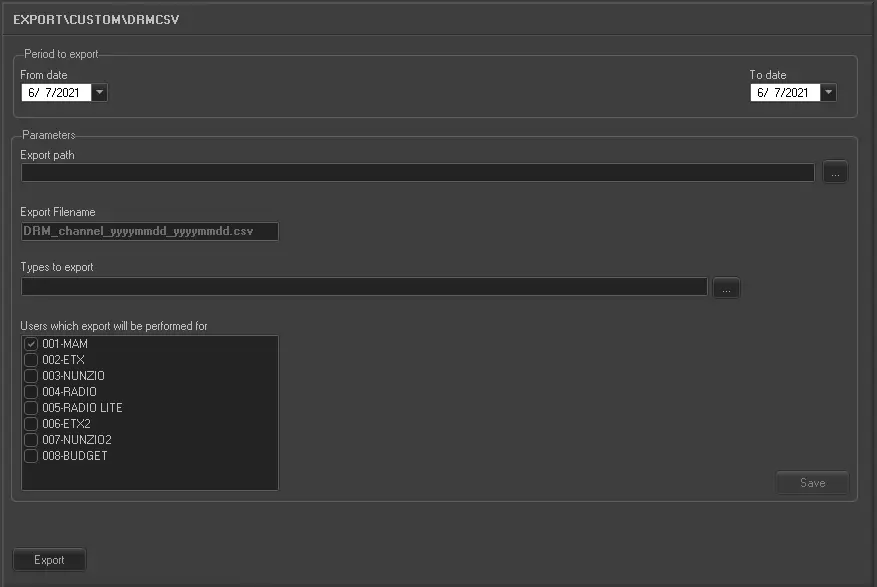
Export_custom_drm_csv
Period to export:
•From date:Select a date to start the export.
•To date: Select a date to end the export. This date can be the same as “From date” to indicate one day schedule.
Parameters
•Export Path: Browse and select the directory where the files to be exported are stored.
•Export Filename: Specify the file name of the CSV file to be created when export is executed. The file name format is "DRM_channel_yyyymmdd_yyyymmdd.csv", e.g. "DRM_PARAMOUNT_20210101_20210612.csv" where first date is the start date, second date is the end date of export.
•Type to Export: Select the specific type of data field to export, e.g. commercials, film, graphics, trailer, news, TV movies, etc)
•Users which export will be performed for: Select the channel to start the export.
Launch Export
Once all the parameters has been fulfilled, click the <Export> button to export DRM information into a CSV file.
 5167_Export_custom_drm_csv