70.3.3.9 Using Multiple Media in HSM
In HSM, if your Server consists of different LTO generations, you can configure each tape drive to accept certain media formats, this arrangement would enable you to use multiple media formats in HSM by retaining even the incompatible LTO generations in the same Tape Library.
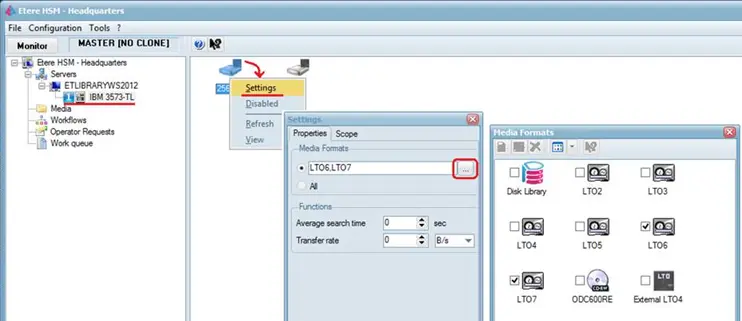
Launch the HSM Headquarters and access to the Server where the drives are connected. Next, right-click on the drive where you want to set the media format and enter the Settings dialog box.
Etere HSM - Headquarters
Instead of accepting “All” media formats, click the browse button to view the available media formats in the system and select the LTO generations dedicated for the drive. Subsequently, proceed to another drive and set a different media formats that cater for your needs.
 hsm_headquarters_lto_multiple_formats