72.5.1.1 Quick editing integration
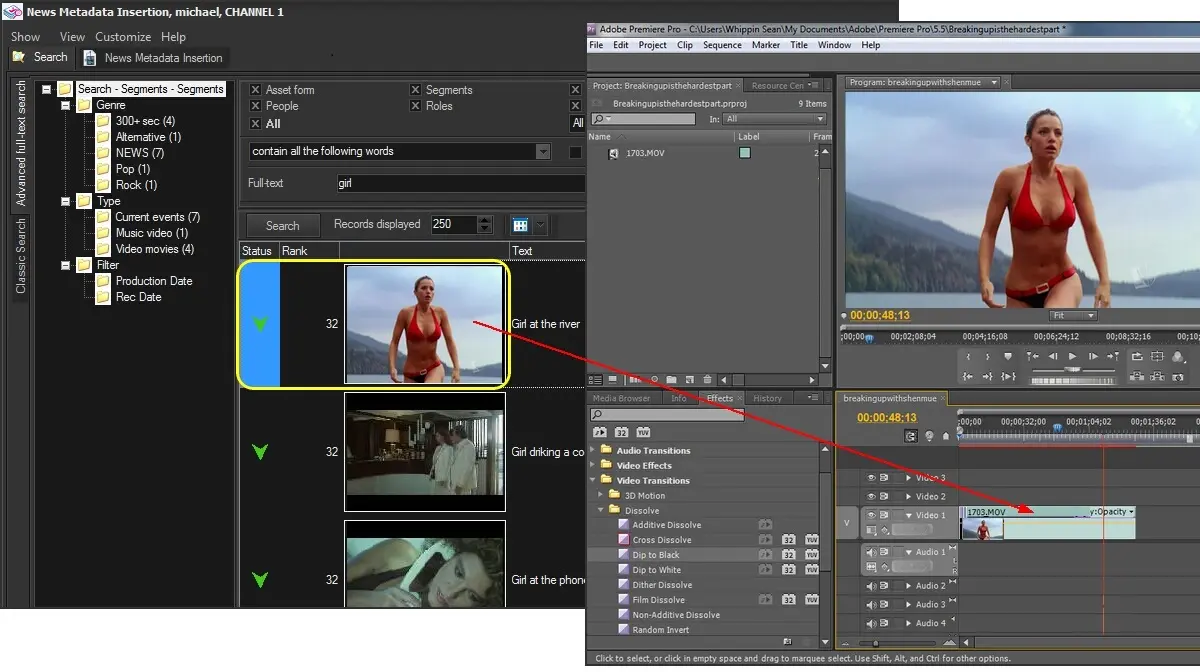
The Metadata Indexing provides an edge Drag&Drop technology to ease the integration of asset segments into editing systems, allowing users to drag and drop a video from the MAM interface in the NLE system timeline.
The drag and drop uses the Etere T-workflow technology to deliver the correct video, or a partial subset of it, at the correct destination. You can drag a video that exists only on your LTO tape, and the Etere T-workflow will deliver it to the NLE with the correct format without any additional command. It's worth mentioning that this feature is also available in the Agenda View to distribute and control the management of assets.
Once searched segments are listed in the results area, where they are displayed including a media status icon which specifies the current status of media files related to each segment, available status include:
Media status - Unavailable
Description : The segment file either doesn't exist in the "archive" or exists with a different codec.
Media status - Offline
Description : The segment file is available in the archive, its download can be requested.
Media status - Requested
Description : The segment file is currently being downloaded as requested into the "local path"
Media status - Error
Description : The segment file has not been downloaded, the request finished unsuccessfully.
Media status - Online
Description : The segment file is available in the "local path" (e.g. its download is complete)
Online files can be directly dragged and dropped into any target including folders and editing systems:
Metadata
Required settings
It's worth mentioning that the quick editing integration needs to be configured by making right-click on the results area:
Contextual functions
Preview - Open the proxy preview tool for watching the video related to the selected segment.
Download - In case the segment is offline, allows requesting its download into the "local path for downloaded clips".
Config - Configure the parameters on which quick editing integration will be based, including:
Workflow for the partial restore - T-workflow to be used for partially restoring offline segment files into the "local path for downloaded clips" when a download is requested.
Local path for downloaded clips - Local directory on which files must be stored -once downloaded- in order to be considered online.
Supported codec - Format that files stored in the "local path for downloaded clips" must have to be considered online.
Delete - Permanently removes the selected segment from the asset on which it is featured.
 METADATA