56.2.1.1 Tools bar
The Toolbar holds several functions which give the operator some information about the playout. When the Automation is running, the bar turns red, and you can see 'ON AIR' displayed:
On the top border, you find specified the channel Automation is broadcasting and the date of the scheduling on air. On the left, you see the function buttons; below are the details for each function:
Function: Initialize all devices
Description: Reset all devices controlled by the Automation.
Function: Open the schedule
Description: Open a new broadcast playlist selected by the operator.
Function: VTR control
Description: Open the VTR Control form.
Function: Configuration
Description: Perform an 'A/B Switch' to access the 'Automation Settings' form.
Function: Message log
Description: Use it to View and Save the Log messages.
Function: Show the device status
Description: Monitor the status of a specific automation device (e.g. remote control, main router, audio over, video server, logo generator, etc.).
Function: Startup layout
Description: Switch to the startup layout, intended for being used before the [play] button is pressed.
NB: Changes to the layout window are automatically saved when the [play] button is pressed.
Function: Playback layout
Description: Switch to the playback layout, intended for use after the [play] button is pressed.
NB: Changes to the layout window are automatically saved when the [play] button is pressed
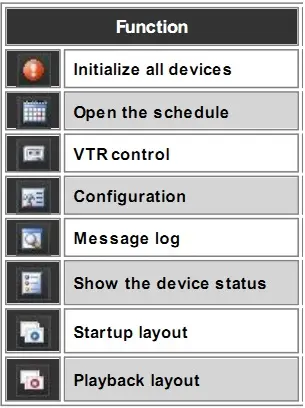 Automation-_Icons_Function