59.5.14 Logs of Access
Report Description
The Logs of access report record the database activities when user login at workstation and accessing to Etere application modules.
Report Filters
Enter the parameters provided below to retrieve the log data pertaining to database activities and all application modules and functions launched by specific user within specific time range.
•Date: Retrieve user access on specific date, or within the specific date range.
•Station: Select a station to trace user activities, e.g. ETX, MAM, Nunzio, etc.
•Users: Includes the user ID or user name in the report, or select “All” to include all users in the report.
•Etere PCs: Specify the name of the Etere PC, or select “All” to retrieve access log from all Etere PCs.
•Features: Filter specific Etere function, or select “All” to filter all features accessed by users.
Report Preview
When all parameters settings are accomplished, you can click on <Preview> button to preview the report layout, or click the <Print> button to print a hardcopy report.
Logs_of_Access_preview
NB: In the “Time” column, if captured the local time of the station when user access the database.
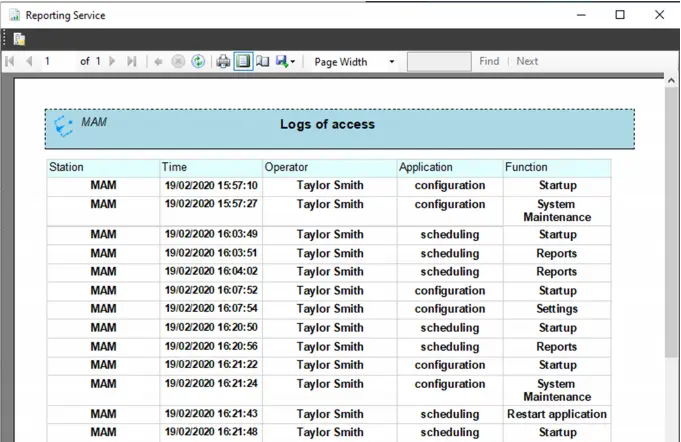 Logs_of_Access_preview.