Etere Data Mover
208.3 DataMover Interface
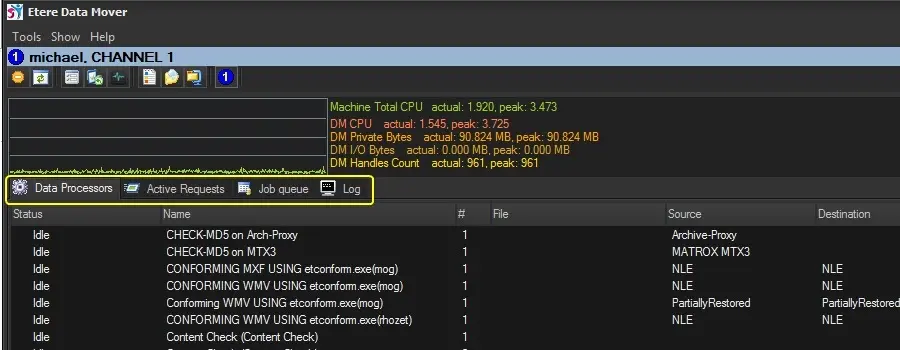
The Etere Data Mover main window is composed by four tabs, user can access (view and manage) all the most relevant information regarding Data Mover tasks, these tabs are:
Datamover000
Available sections:
Data Processors
Active Requests
Job Queue
Log
NB: Please note that the monitoring panel located above the tabs can be enabled/disabled from the Tools menu.
Important:
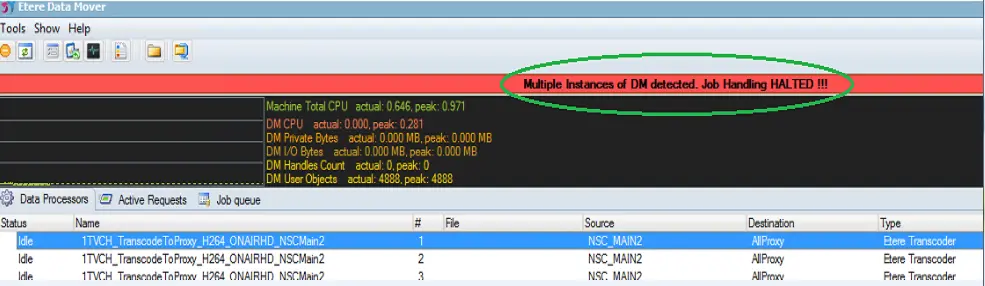
It is curious to note that at any one time, only one instance of Data Mover can be active in the workstation. If there are more than one Data Mover instances activated on the same workstation, all Data Mover’s jobs would be halted and user would be notified with error message, as indicated in the screenshot below.
Datamover_multiple_sessions
 Datamover000
 Datamover_multiple_sessions