201.13.6.3 Multichange data
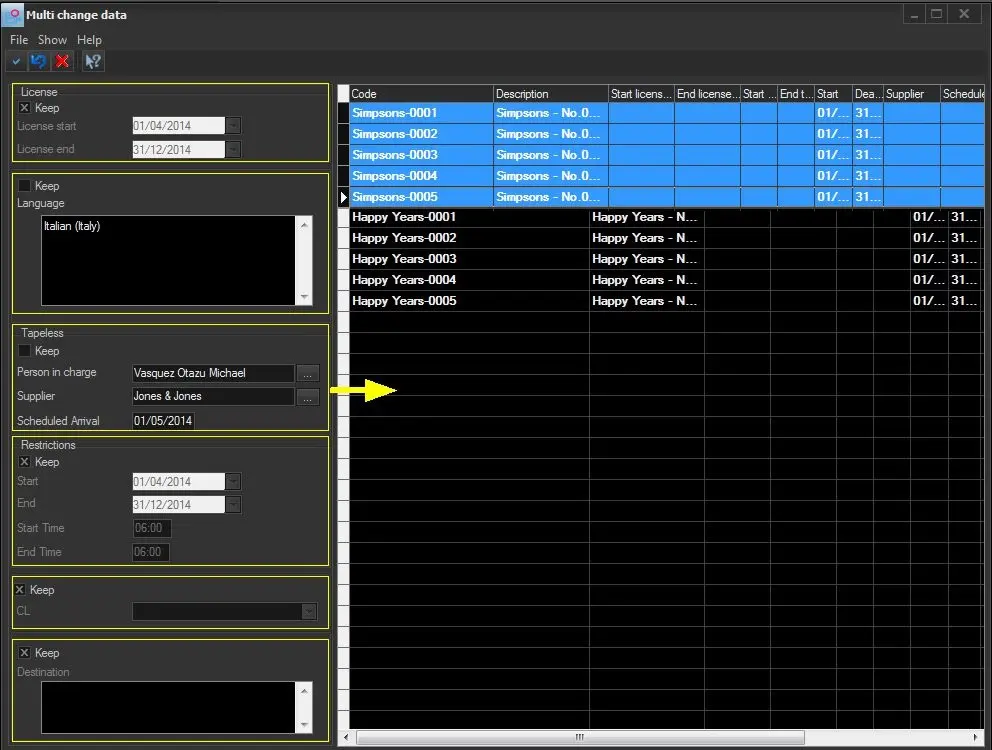
The "Multichange data" functions provides a useful interface to quickly modify one or more properties across multiple order lines. Data supported for multi-change includes license dates, language, tapeless, classification and restrictions.
Bms_ott_multichange_01
In order to start changing data across multiple order lines follow the procedure below:
1. In the left panel, Deselect the "keep" option from data (e.g. language and tapeless ) intended to be changed.
2. Select the "keep" option for data not to be changed (i.e. intended to be maintained).
3. In the right panel, choose the order lines to which changes will be applied.
4. Press the [Apply] button to save all changes across selected order lines
Note
Please note that in case an order line has multiple restrictions, it will be listed one time for each restriction. For instance, if the order line "Peanuts 01" has 2 restrictions, it will be displayed twice in the right-hand list, one for each restriction.
 Bms_ott_multichange_01