Resource Configuration
59.6.2.200 Playbox Logo
Etere controls the Playbox Logo resource either via TCP/IP or via UDP (using the 8012 port as default)
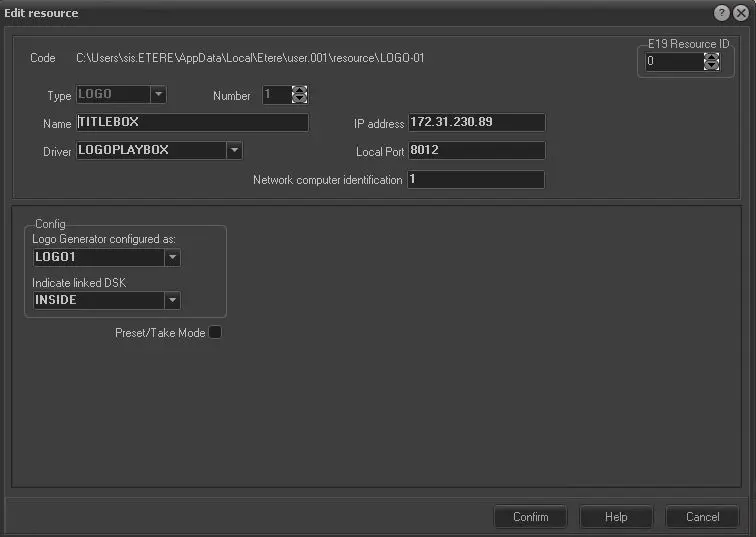
Edit Resource Information
The information shown in the first part of the form has a description purpose only; it shows previously assigned data:
- Code: shows the resource path you are editing
- Type: indicates the resource type
- Number: shows the ordinal number to identify the resource in case you have other resources of the same type
The user must set the following information
- Name: a description of the resource you are editing
- Driver: depending on the device type:
- LOGOPLAYBOX
It requires to specify the Config parameters:
- IP Address: indicates the IP of the resource to be driven
- Local Port: means the Port to be used (by default is 8012)
- Network computer identification: identification number provided by the device
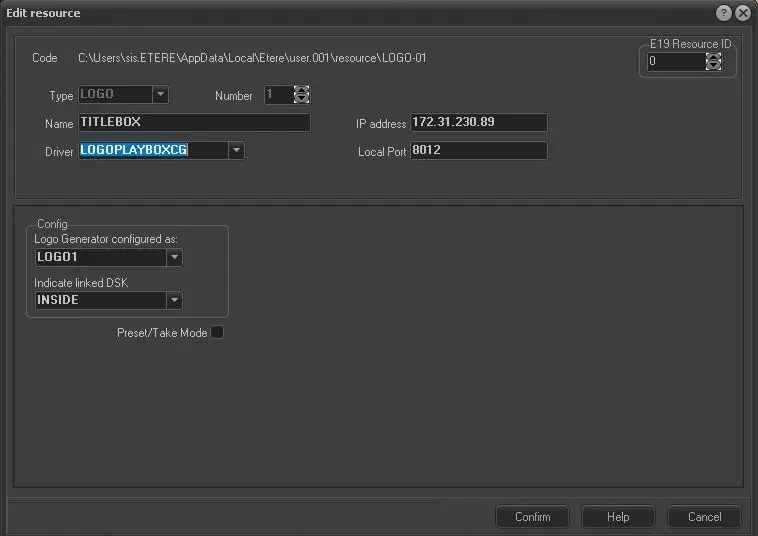
- LOGOPLAYBOX CG
It requires to set the following Configuration:
- IP Address: indicates the IP of the resource to be driven
- Local Port: means the Port to be used (by default is 8012)
DRIVER ADDITIONAL CONFIGURATION
For both drivers, the following additional Configuration are available:
- Logo Generator configured as Indicate how the logo must be configured.
- Indicate the associated DSK: Indicate if the DSK is internal (INSIDE) or if one of the resources previously configured must be associated. (Warning: only active DSKs are shown; that's why you should have a DSK already configured)
- Preset/Take Mode: Some devices can pre-load the logo before playing it out to speed up the operation during the take.
- You can get this feature using preset/take mode instead of standard mode. The preset/take mode is suggested if you use a commutation for each event. Otherwise, you could obtain unpredictable results.
- IP Address: indicates the IP of the resource to be driven
playbox_resource_config
playbox_resource_config_2
titlebox_cg_role
 playbox_resource_config
 titlebox_cg_role
 playbox_resource_config_2