59.5.1.2 End-user Reports
What is a custom report?
Following Etere's compromise on meeting its Customer's needs and taking into account that each Customer has a different operational T-workflow, it has implemented a service consisting of the implementation of end-user custom reports based on the versatility and reliability that can only be achieved by the use of Microsoft SQL Server technology including Reporting Services.
Therefore, a custom report is a version of an existing system report, modified to suit the specific needs of a particular customer; custom reports can be easily integrated into the Customer's Etere installation just by uploading them from a user-friendly reports management interface. Custom reports are released as. RDL files are named using the following Etere's naming convention:
[ReportCode]_[CustomerCode]_[ReportName].RDL, where:
• [ReportCode]: The code of the system report from which the custom report has been created.
• [CustomerCode]: It's the Customer's code for which the system report has been customized.
• [ReportName]: The self-explaining and friendly name given to the Report; it could be the same as the source report or a more detailed modified name.
For instance, if a particular system Report, for example, the R100013_MonthlyRevenues.rdl Report (code = 100013 and name = MonthlyRevenues) is modified for the Customer with code 1234; the filename of the custom report may be:
R100013_C1234_MonthlyRevenues.rdl (or even R100013_C1234_MonthlyRevenues-ExtraFields.rdl for a more detailed report naming).
Please note that in cases where the Customers Support team modifies a custom report by request customer, derived versions will be named progressively using the following format: R100013_C1234_V001_MonthlyRevenues.rdl, R100013_C1234_V002_MonthlyRevenues.rdl, R100013_C1234_V003_MonthlyRevenues.rdl, and so on.
How do you Request a Custom Report?
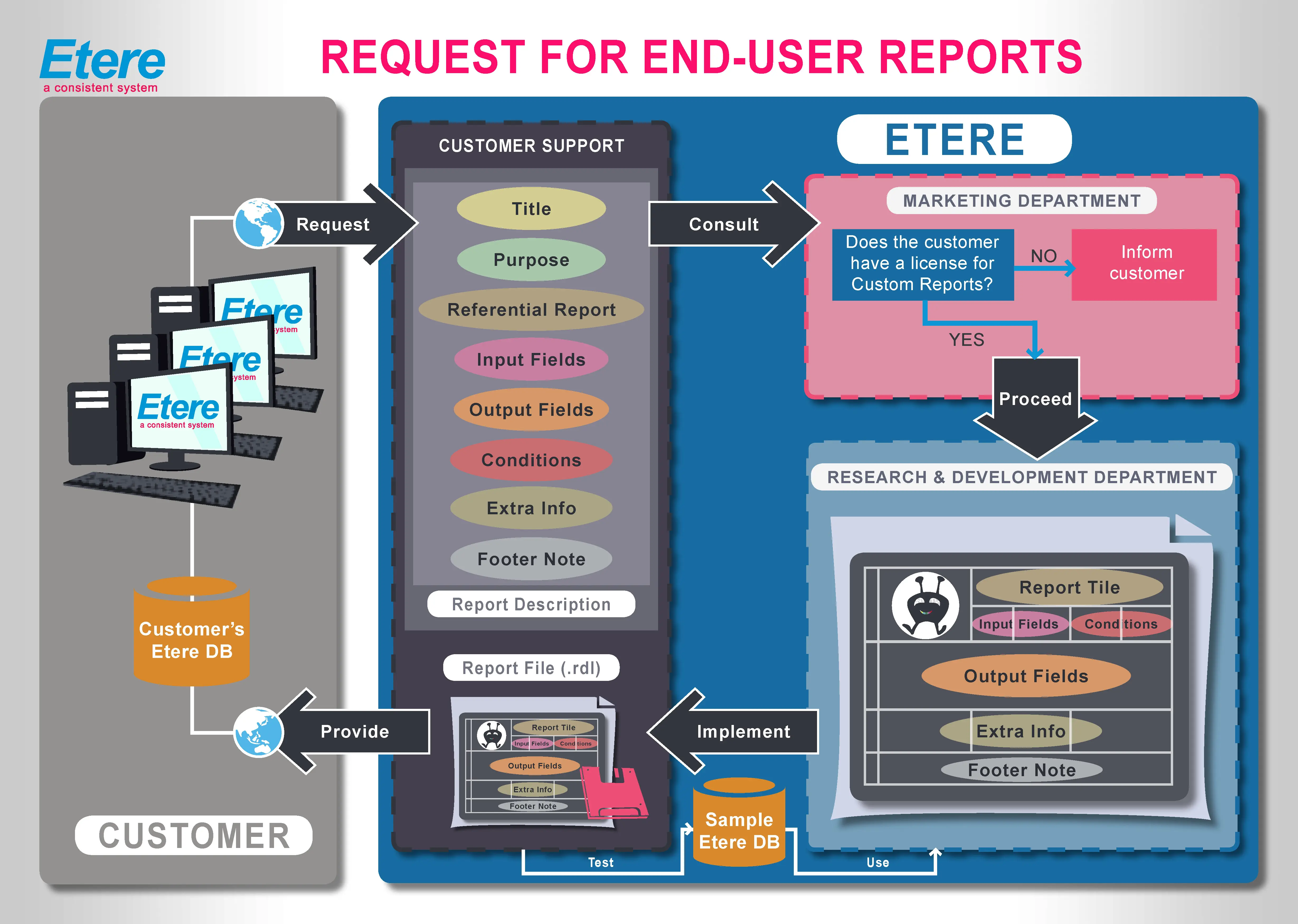
The procedure that a customer must follow to request a custom report is clearly explained in the following flowchart and the steps below:
request_for_end-user_report
1. The Customer requests the Report to the customer support team, specifying the following information:
• The title to be displayed on the report header,
• The purpose of the Report,
• The referential Report to modify (in case of modifications),
• The input fields on which the Report will be based,
• The output fields to be included in the Report,
• The conditions used to retrieve the output fields,
• The sorts that should be applied to the output fields,
• The special calculations needed to be included (e.g., subtotal, total, etc),
• The footer notes to be appended to the Report,
• Any further information.
2. The customer support team consults the marketing department if the Customer counts with a valid license for 'custom reports'
3. In case the Customer counts with the license in question, the Research & Development department proceeds with the implementation of the Report; otherwise, the Customer is informed about missing licenses,
4. The Research & Development department releases the report file using Etere's naming convention (see the paragraph above).
5. The customer support team verifies the correct functioning of the Report on a sample database, after which the Customer is provided with the requested Report.
6. The Report will be available in the Customer's reporting server as a User Report within the /Etere Reports/User path.
NB: Custom end-user reports are implemented and provided in the Customer's regional language; however, the Customer can specify the language in which the Report should be implemented.
 request_for_end-user_report