59.3.13.6 Configuration section
Etere allows the configuration of an unlimited number of Gen21 web services, thus making it possible to consult (and update) asset data across multiple Gen21 systems from one T-Workflow.
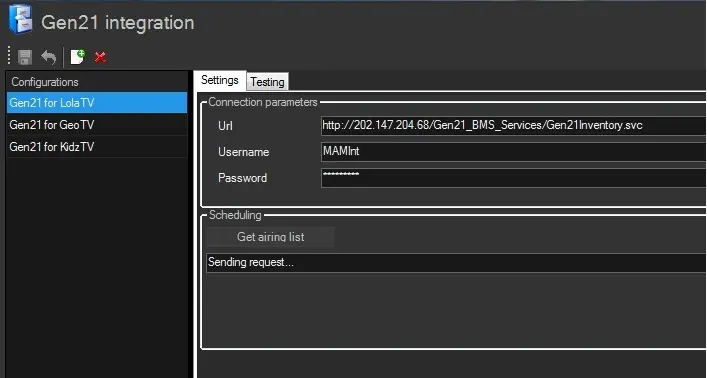
The "Gen21 Integration" section specifies, for each system, the access parameters (URL, username and password) required for connecting and interacting with Gen21 systems.
Note:
Please note that the Gen21 section is available only if an ET5526 license is installed.
Settings
To create a new configuration, click on the [New] button and compile the following information under the "Settings" tab:
Settings_tab
Connection parameters
Parameter - URL
Description: URL used by the Gen21
Parameter - Username
Description: Username authenticated in the Gen21 web service
Parameter - Password
Description: Password required for authenticating the username
Scheduling
Parameter - [Get airing list]
Description: Pressing this button schedules a job in the SQL agent of the Etere database; this job will automatically read (e.g. once a day at 02:00:00) the assets scheduled in Gen21 airing lists for the current station (e.g. channel 01), inserting all found performances in Etere playlists.
It's worth mentioning that this function is performed according to the following criteria:
▪Assets are inserted into a special scheduling level
▪Only assets existing in the Etere system are inserted in playlists
▪Existing asset performances are removed before the insertion
▪Assets are inserted in playlists starting at midnight (00:00:00)
NB: Assets are matched between systems through Gen21's house number and Etere's code.
Testing
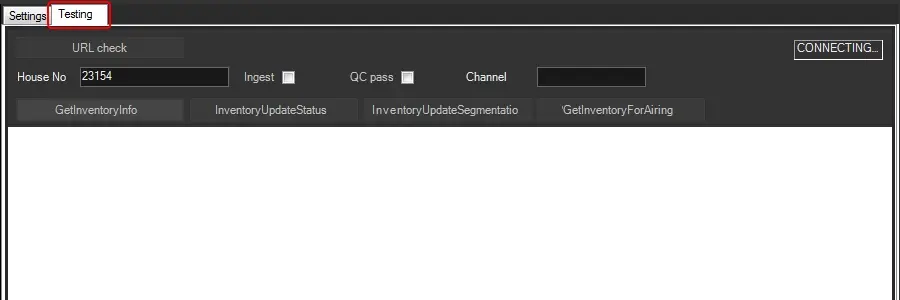
The "Testing" section allows, as its name suggests, testing the working status of some functions on a Gen21 system:
Testing
Parameter - House No.
Description: Indicate the identification string of the asset in the Gen21 system
Parameter - Ingest
Description: Indicate if the asset already has one ingested file
Parameter - QC Pass
Description: Indicate if the asset is suitable for broadcast
Parameter - Channel
Description: Specify the station on which the asset is scheduled
Function - [GetInventoryInfo]
Description: Return content information of the asset matching the House No.. It's worth mentioning that one media/house number might have multiple media content.
Function - [InventoryUpdateStatus]
Description: Update the Ingest and QC Pass status of the asset
Function - [InventoryUpdateSegmentation]
Description: Update the EDL marks of an asset
Function - [GetInventoryForAiring]
Description: Returns the scheduling status of the asset on a particular channel
 Settings_tab
 Testing