52.2.5 Stand-Alone mode - General parameters
In the following Chapters we are going to have a look on how to configure Etere Adinsertion ETX in Stand-Alone mode.
ad_insertion_standlone
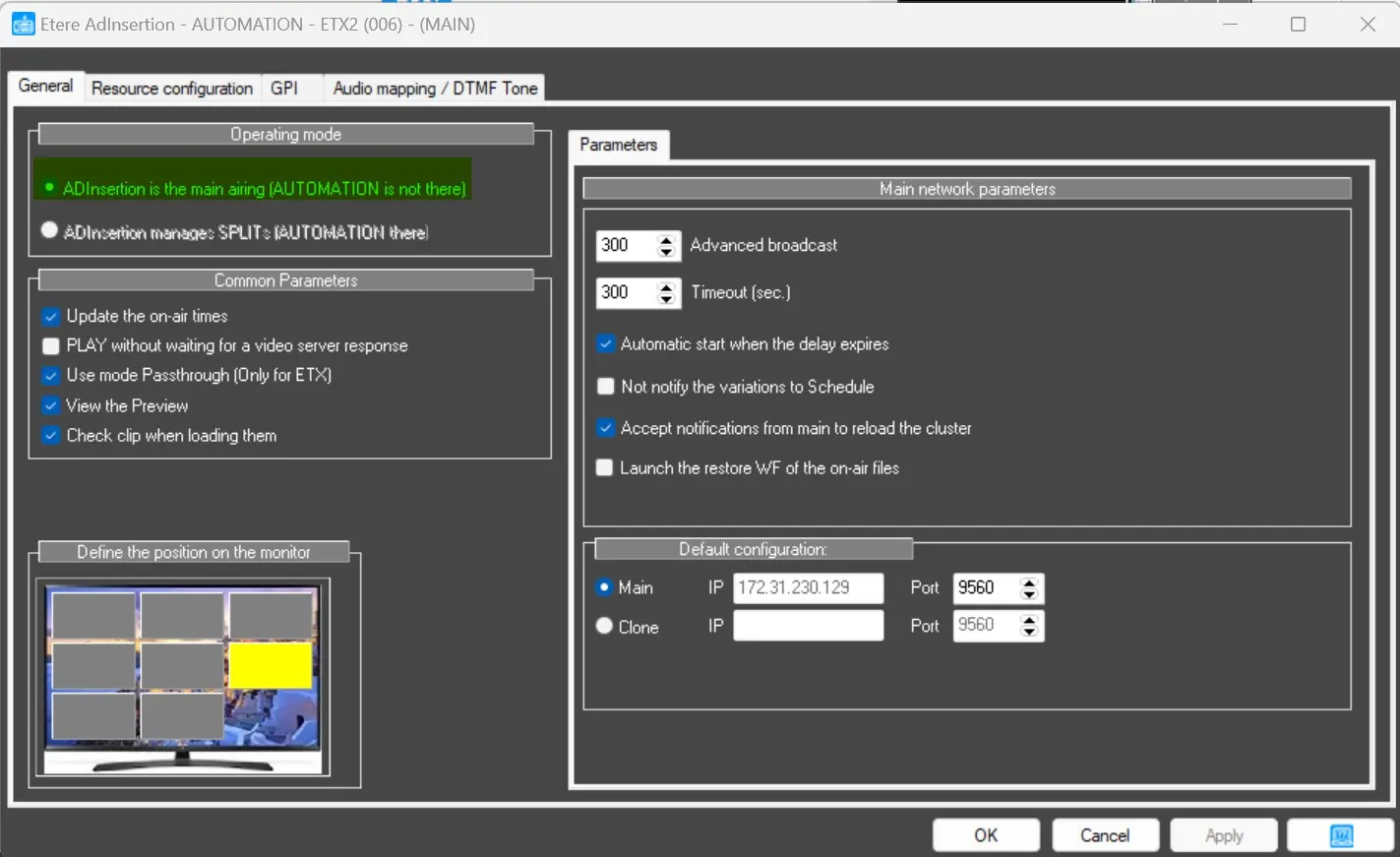
AD INSERTION STAND-ALONE CONFIGURATION
If the Operating Mode is set to:
Ad Insertion is the Main airing (Automation is not there)
the following parameters are shown, and it's possible to change them by needs:
Main Network parameters
• Advanced Broadcast: It allows the operators to manually advance the start of the Commercial Break for N seconds. For example, if this parameter is set to 300 seconds (as it actually is at default) and the first event of the break is scheduled to start at 10:00, the operators have the possibility to already start broadcasting the schedule manually at 9:55.
In case the play command is given earlier than the value set (for example, at 9:53), Etere AdInsertion would prompt a warning, preventing the execution of the command.
• Timeout: The timeout limit when the Commercial Break should start. This parameter allows basically to delay the start of the playlist. If it's set to 300 seconds (as it actually is at default) and the first event of the break is scheduled to start at 10:00, AdInsertion would wait until 10:05 to start broadcasting.
• Automatic Start when delay expires: It will eventually starts the Commercial Break when the Timeout actually expires.
• Not notify the variations to Schedule: If enabled, notification from the main schedule would be ignored. Modification to schedule would not be accepted.
• Accept notifications from MAIN to reload the cluster: If enabled, Ad Insertion would release the decoder (if unused) when notification is received from main schedule.
• Launch the restore WF of the on-air files: It will execute the Default Restore T-Workflow to restore AdInsertion materials into the selected Video Folder.
Default Configuration
In this section we can setup the fault tolerance for Etere Adinsertion.
• Main: It shows the Main AdInsertion Ip address and allows to set the Port where AdInsertion MAIN would exchange communication with the BACKUP.
• Clone: It shows the BACKUP AdInsertion Ip address and allows to set the Port where AdInsertion BACKUP would exchange communication with the MAIN.
 ad_insertion_standlone