84.2.2.7 Loudness statistics
The Loudness Statistics module allows to calculate and display the loudness information of the current television day, thus permitting a visual analysis of the loudness variations between events.
The Loudness Statistics module will automatically calculate the “daily loudness average” of the television playlist by computing the loudness average of all the events featuring on it. This information will allow the application to perform the following checks:
• The events present in the playlist do not exceed in more than ‘x’ dB the daily loudness average.
• The events present in the playlist do not exceed in more than ‘y’ dB the previous event loudness.
User Interface
In the top part of the Loudness Statistics main window, there will be displayed the following information regarding the loudness values of the events scheduled in the currently open television day:
4923_Loudness_Statistics
• Daily loudness average: The calculated "middle" value of all the loudness values of the events scheduled in the current open television day.
• Minimum loudness: The lowest value among all the loudness values of the events scheduled in the current open television day.
• Maximum loudness: The highest value among all the loudness values of the events scheduled in the current open television day.
The Loudness Statistics section provides three different views for analyzing the loudness variations present in the working television day:
Graphic
This area provides a graphical view of the loudness variations present in the schedule. This area is formed by a 3D line chart "loudness vs time" containing two lines, one indicating the "daily loudness average" (e.g. -22 dB) and another one indicating the "events loudness variations" (e.g. -24.13 dB, -23.55 dB, -24.36 dB, etc).
For a better understanding, values displayed in the line chart will be colored using specific colors (specified in the "Settings" section) according to the following criteria:
Values within the normal range - Events which loudness is considered adequate.
Values outside the normal range - Events which loudness is considered inadequate due to a sensitive difference with the daily loudness average.
Values outside the normal range - Events which loudness is considered inadequate due to a sensitive difference with the previous event loudness.
Loudness
This area contains all events scheduled in the current working television day, indicating for each one of them its "scheduled time", "event description" and "loudness value".
It is worthy mentioning that those events with a loudness value which is outside the "normal range" (specified in the "Settings" section) will be highlighted using a predefined particular color:
Values within the normal range - Events which loudness is considered adequate (highlighted in BLUE in the images).
Values outside the normal range - Events which loudness is considered inadequate due to a sensitive difference with the daily loudness average (highlighted in RED in the images).
Values outside the normal range - Events which loudness is considered inadequate due to a sensitive difference with the previous event loudness (highlighted in YELLOW in the images).
Control table
This area provides a detailed list of all events scheduled in the current working television day including -besides their scheduled time, description and loudness value- also the following information:
Diff prev: The difference between the loudness value of the event in question and its immediately previous event in the schedule.
Warn prev: Indicates with a "X" that the "Diff prev" value is outside the normal range (i.e. the interval determined by the "diff prev" +/- the prevTolerance).
Diff avg: The difference between the loudness value of the event in question and the calculated "daily loudness average".
Warn avg: Indicates with a "X" that the "Diff avg" value is outside the normal range (i.e. the interval determined by the "diff avg" +/- the avgTolerance).
Making click on the [Show only warnings] button, the "Loudness" and "Control table" statistics will contain only those events for which a warning has been detected. Moreover, the [Refresh] button will allow to quickly update the asset's loudness data and recalculate the loudness statistics.
Tool Settings
The [Settings] button, available in the upper toolbar, will allow to set the parameters used for calculating the loudness statistics, these parameters includes:
4922_Parameters
Maximum allowed tolerance with respect to the daily average: Set the tolerance that will determine the allowance interval which goes from the "average difference - average tolerance" to the "average difference + average tolerance".
Highlight events outside the normal range using color: Set the color to be used for coloring statistics corresponding to a value outside the normal range (with respect to the daily average).
Maximum allowed tolerance with respect to the previous event: Set the tolerance that will determine the allowance interval which goes from the "previous difference - previous tolerance" to the "previous difference + previous tolerance".
Highlight events outside the normal range using the color: Set the color to be used for coloring statistics corresponding to a value outside the normal range (with respect to the previous scheduled event).
Values within the normal range: Set the color to be used for coloring statistics corresponding to a value within the normal range (i.e. within the daily average interval and the previous event interval).
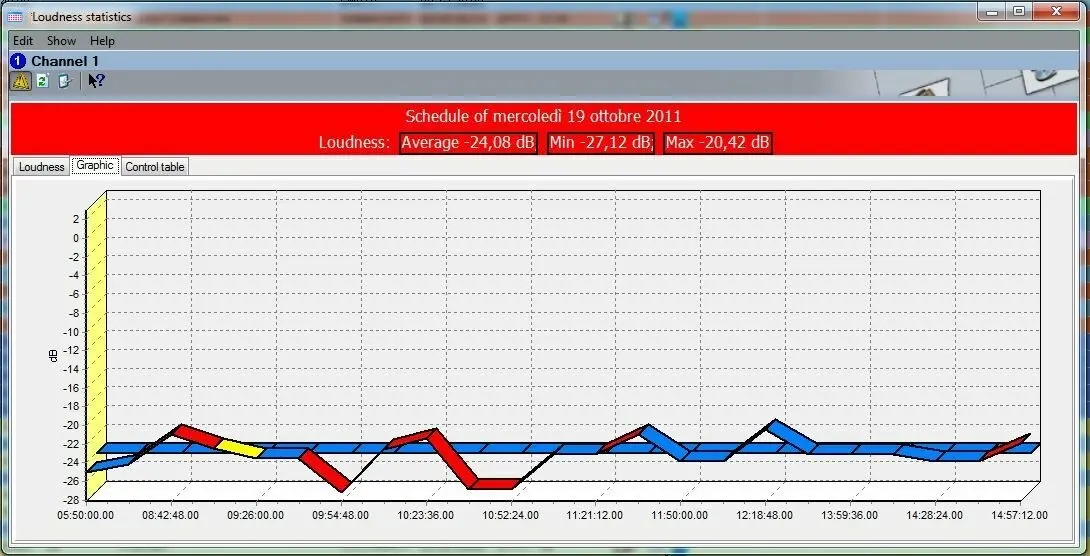 4923_Loudness_Statistics
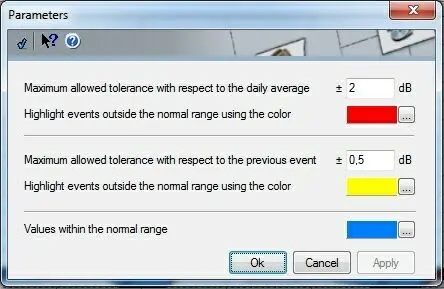 4922_Parameters