84.2.4.10 Interactive Schedule
The Interactive Schedule secondary event, as its name suggest, is used to indicate the system that a certain block of the current schedule is interactive, that is, viewers can decide what events to air during this block (e.g.: during the 'viewers choice' interval, where they phone up and request a particular music track to be played).
In order to set a block in the schedule as interactive, just associate an 'active' and a 'not active' interactive schedule secondary event to the first and last event of the block respectively.
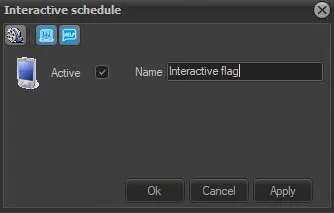
4944_Interactive_Schedule
Active: Check this parameter to enable the secondary event, leave it unchecked to disable it.
Name: Give it a brief descriptive name.
Icon: Make double-click on the default icon to change it with a more suitable one.
Note: Interactive Schedule secondary events are detected by ETERE during schedule exports, to automatically include them into exported data.
Media Library [F7]: Open the Media Library clicking on this button on the secondary event's toolbar. It allows to load the asset related to the primary event for which the secondary event is being defined. If there are unsaved changes, before opening Media Library a message will be prompted, asking to save or not the modifications to the secondary event.
 interactive_schedule