84.4.4.39 STANDARD > SOUNDMOUSE XML
Export Scope
The Export_Standard_Soundmouse XML export scheduling, transmission data and production data within the indicated date range to an XML file.
During export, the process must insert <ProductionCompany> and <Productions> tags in the exported file, even these tags contains no data. The exported file cannot be processes without these 2 tags in the file.
Export Parameters
Export_standard_soundmouse_xml
Period to export
From data – To date -
Select a start date and end date to extract data within the date range.
Parameter - Export path
Description : Select a path in the local or network drive to park the generated XML file.
Parameter - Export Filename
Description : it is possible to define the prefix and a description of the file:
•Prefix: Enter a source name of the broadcaster or network. Space or “-“ are not allowed. E.g. ABC
•Date and Time: The creation date and time of the XML file in accuracy of milliseconds in “YYYYMMDD-HHMMSSsss” format. E.g. “20180329-152300000”
•Custom description: Provide useful information to identify the exported XML file in the directory. Allowed characters are A-Z, a-z, 0-9 and “_” (underscore) with maximum length of 255 characters, e.g. SYSTEM7-CH3
•XML: The extension of the exported file.
Example: An XML created on 29 March 2018, at 3:23:58.000 pm for ABC, the file name would be:
ABC_20180329-152358000_SYSTEM7-CH3.xml
Parameter - Types to export
Description : Click the browse button to display all event types defined in the system, and select the types to be exported.
Parameter - ChannelUniqueIdentifier
Description : Enter the name of the channel unique identifier.
Launch the export
Once all the parameters and period to export are fulfilled, save the parameters settings and click the <Export> button to start the export.
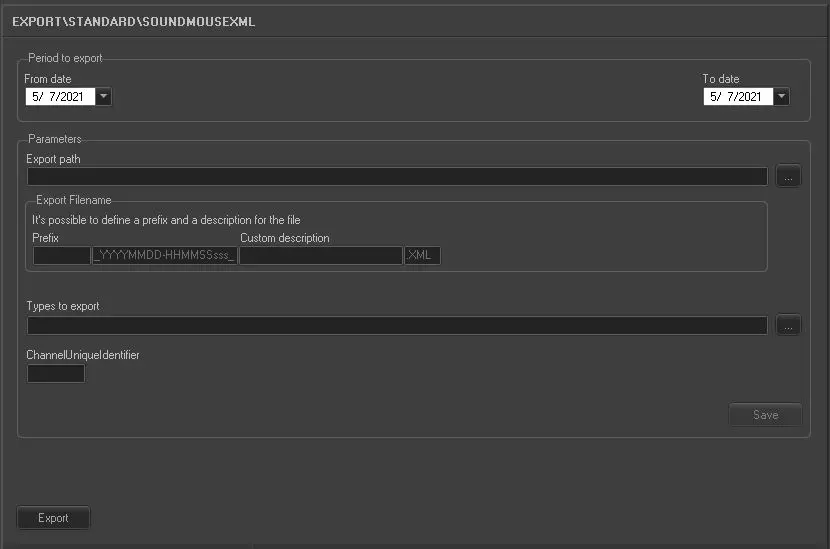 5103_Export_standard_soundmouse_xml