59.9.2 Available operations
The functions provided by System Maintenance consist mainly of the reorganisation of the database, the checking of its integrity, and its update according to the latest changes.
Once opened, the System Maintenance module would display the Etere system's current version (i.e. of the SQL database) and available new version (i.e. to be installed), using the following colors to indicate the differences between versions:
Green - The current version is older than the new one; the system will be upgraded.
Yellow - The current version is the same as the new one; no update will be performed.
Red - The current version is newer than the new one. Attention! The system will be downgraded.
Available operations
All maintenance tasks available for the installed version are listed and described below:
Database_version
Structure check
Check Main database structure - If enabled, the system maintenance function will be performed on the central database, including:
Tables - Create or update the tables and fields on which Etere is based.
Functions - Create or update the stored procedures used for Etere operations.
Other - Other minor operations, such as creating a database index.
Do.Ma. Db - If upgrading from Etere 21 or lower, all existing Do.Ma. Data stored in the central database will be migrated to the new Do.Ma. Database (set in system settings).
Log db - If upgrading from Etere 24 or lower, all existing log data stored in the central database will be migrated to the new Log database (set in system settings).
1: This operation requires the user to have "SQL administrator" permissions.
2: A detailed view of this function can be obtained through the "Advanced Scripts View".
3: If a database collation has been performed, execute this maintenance task to rebuild all database functions and stored procedures in the Etere database.
Check Disaster Recovery database structure - If a disaster has taken place and the Main database has been synchronised to the disaster recovery database at the DR site, enable the option to perform system maintenance on the database structure on the disaster recovery database.
You must have SQL Administrator rights to perform this function.
Common checks
SQL Reports Repository Maintenance - If enabled, the system would search the Etere installation directory and a user-defined directory for reports (.RPT and .RDL) files, updating the database according to the retrieved reports (existing reports will be updated, new reports will be inserted and no-longer-existing reports will be removed from the reporting server).
Please refer to the Etere Reports > Updating the reports repository chapter for detailed information on this function.
NB: It is not mandatory to run “SQL Report Repository Maintenance” on the SQL Database Server.
Delete unused fields - If enabled, all fields used by former Etere versions but no longer used in the current version will be deleted from the database tables.
Check database integrity - This function checks the logical and physical integrity of all the objects (tables) in the database. Detailed information on this function can be found manually in the How to check the database integrity chapter.
Before launching this function, it is advised to make sure all Etere modules accessing the SQL database are closed (except Automation); therefore, set the database access to "single-user mode" logged as an SQL Server administrator. Once finished, the database will be automatically set back in "multi-user mode".
NB: It's highly suggested to perform this operation only when required since it may take several minutes.
Update statistics - If enabled, the query optimisation statistics of all Etere tables will be updated to ensure that queries will be compiled with up-to-date statistics, thus improving the query plan and its performance.
The Update Statistics task is beneficial to mitigate the intermittent slowness during database queries if you have upgraded to a new version of Etere software.
Update screen language - If enabled, the system screen language will be updated based on Etere's language repository (etereln.mdb), all the EXISTING terms (labels, descriptions, captions, etc) used in Etere will be updated, and the NEW terms added.
Create Database of parameters - If enabled, a separate database containing the main database parameters would be created. The new database will be created in the following format:
• For Etere 22.02 or higher: Params_[CustomerCode]
• For Etere 22.01 or lower: Params_[CustomerCode]_[Date]_[Time]
Create asset forms for old memory files - Enable this option to search for old memory files in the database, including those already archived in HSM, and link the files to the new asset forms.
• The new asset form would be created with UTC time indicated in the file name; any asset code or time-related information would be converted to UTC in the new asset form.
• If the file has already been inserted into the database with asset code in Local time, another asset with UTC code would not be inserted.
• If there is more than one encoder per memory, the memory files are associated with the same asset with its dedicated codec.
• Upon completion, when searching for Memory assets created by the System Maintenance task the “Memory” option in the custom Search form must be enabled.
Full-text search
Full-text search - If enabled, a full-text index would be created in the Main (and Do.Ma.) database, thus making it possible to perform full-text searches from the Etere modules, such as the Media Library.
Disaster Recovery full-text search - If the Main database has been synchronised to the disaster recovery database at the DR site, enable this option to create a full-text index in the disaster recovery database and DoMa database to allow a full-text search to be performed in various Etere Modules.
NB: Please note that to support the indexing of portable documents (.pdf) and Microsoft documents (.docx, etc), it is required to first install the PDF IFilter and MS Filter Pack before enabling the full-text search.
Miscellaneous
Save Certificate - The station identity certificates would be backed up if enabled.
Restore Certificate - If enabled, the station identity certificates would be restored from a previous backup.
Structure congruency
Check main database congruency - If enabled, it allows the checking of the structure of the central production database by comparing it against a temporary database to verify its correctness after an update operation and point all encountered incongruence through the Etere Database Tools utility.
The temporary database is automatically created on the fly, after which a "check database structure" is performed to make all the tables and functions required for the comparison. Once the checks ended, the temporary database would be deleted from the SQL server.
Due to the numerous checks implied in this operation, it may last several minutes, depending on the system's performance.
Etere Database Tools - If enabled, it opens the Etere Database Tools utility, a useful tool for comparing the structure of two databases and exporting all encountered differences.
NB: Clicking the System Maintenance menu while executing the maintenance task would interrupt the maintenance process; click again on the Maintenance Menu to resume the processing.
After-upgrade maintenance
When you upgrade your system, the system maintenance must be performed with at least the following options enabled:
✓ Check the main database structure
✓ SQL reports repository maintenance
✓ Update screen language
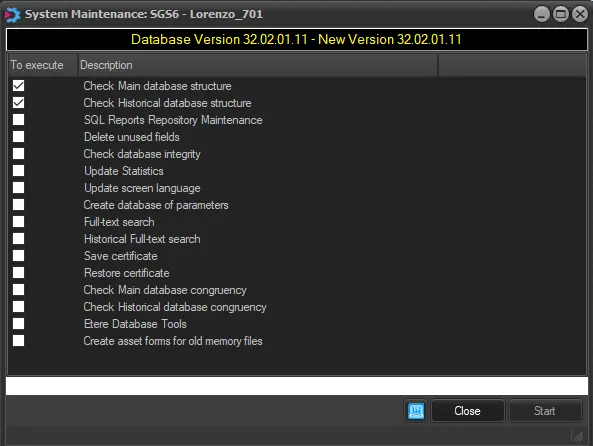 database__version