84.4.5.38 STANDARD > SUBTITLES MULTIFORMAT
Import Scope
The Import Subtitle MultiFormat import a subtitles file in different languages and associate the subtitles to specific assets. The import is able to manage subtitles file in multiple formats, it would run a compatibility check with the file formats listed in the “Format” parameter before proceed to import the subtitles file.
Import parameters
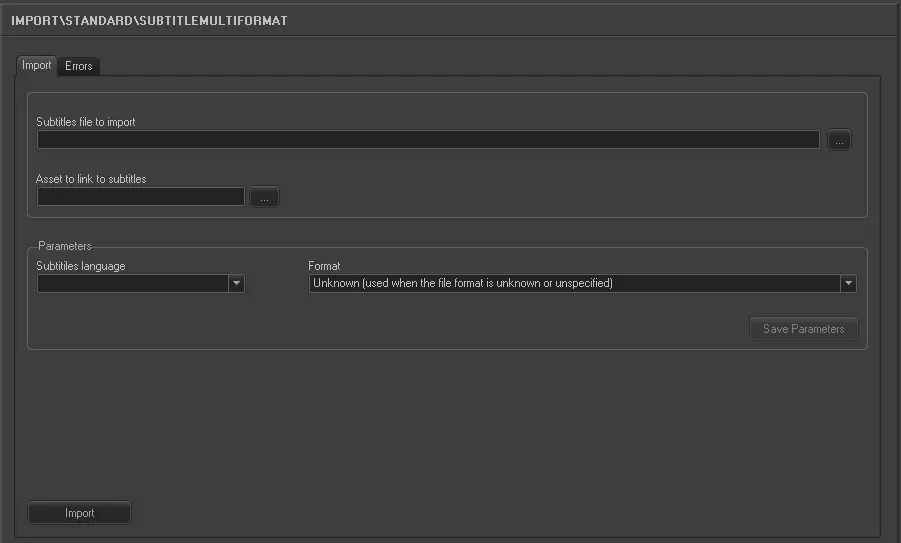
Import_standard_subtitle_multiformat
Parameter - Subtitles file to import
Descriptions : Specify the subtitles file name to be import, or use the browse button to select the subtitles file from the network drive. The file extension are varies depending on subtitle types and file format. The subtitles file (i.e., Test123.pac) is managed based on the following criteria:
•If the asset code does not exist in Etere, the subtitles file is skipped and renamed to “Test123.pac.err”
•If the import is successful, the subtitles file would be renamed to “Test123.pac.done”
•If error occurred during import, the subtitles file would be renamed to “Test123.pac.err”
Parameter - Asset to link to subtitles
Descriptions : Select the asset to be associated with the subtitles after import.
Parameter - Subtitles language
Descriptions : Select the subtitle language to be imported. The available languages are defined in Configuration > Settings > Basic Configuration > Languages.
Parameter - Format
Descriptions : Select a file format from the list. You can select “Unknown” when the file format is unspecified or unknown.
The supported file formats are:
Format name - Unknown (File format is unknown or unspecified)
File extension : Can be varies
Format name - EBU (European Broadcasting Union format Tech. 3264-E)
File extension : .EBU or .STL
Format name - SAMI (Microsoft Synchronized Accessible Media Interchange format)
File extension : .SMI or .SAMI
Format name - TXT (Plain-text format)
File extension : .TXT
Format name - WMF (Windows Media format)
File extension : .WMV or .WMA
Format name - Structured Titles (Subtitles from TXT file in structured title format)
File extension : .TXT
Format name - RhozetXmlTitler (Subtitles used by Rhozet, structured XML format)
File extension : .XML
Format name - Etere SQL (Subtitles used by Etere, in sbt_* tables)
File extension : SQL tables
Format name - CavenaTxt (Subtitles files in Cavena Txt format)
File extension : .CIP
Format name - SoftniSub (Subtitles files in Softni SUB format)
File extension : .SUB
Format name - PAC (Subtitles files in PAC Screen Systems format)
File extension : .PAC
Format name - DaaiTxt (Subtitles files in DAAI TV Txt format)
File extension : .TXT
Format name - PlayboxSub (Subtitles files in Playbox Sub format)
File extension : Can be varies
Format name - SCC (Scenarist Closed Captions)
File extension : .SCC
Click the <Save Parameters> button to save all parameters.
NB: If the import is triggered by F90, the current directory in both Import and F90 must be set. If subsequent import could not read the import parameters completely, the parameters saved in the Registry would be read in order to proceed with the import.
Launch the import
Once all the parameters are fulfilled, click the <Import> button to start importing the subtitles file.
 5249_Import_standard_subtitle_multiformat