56.1.6.1 Main/Backup Mode
An Etere Main/Backup automation implementation allows stations to configure a main automation from which the playout will be executed. It keeps the backup automation updated, and the system automatically replaces the main automation in case of failure.
Main_Mode
Main Mode
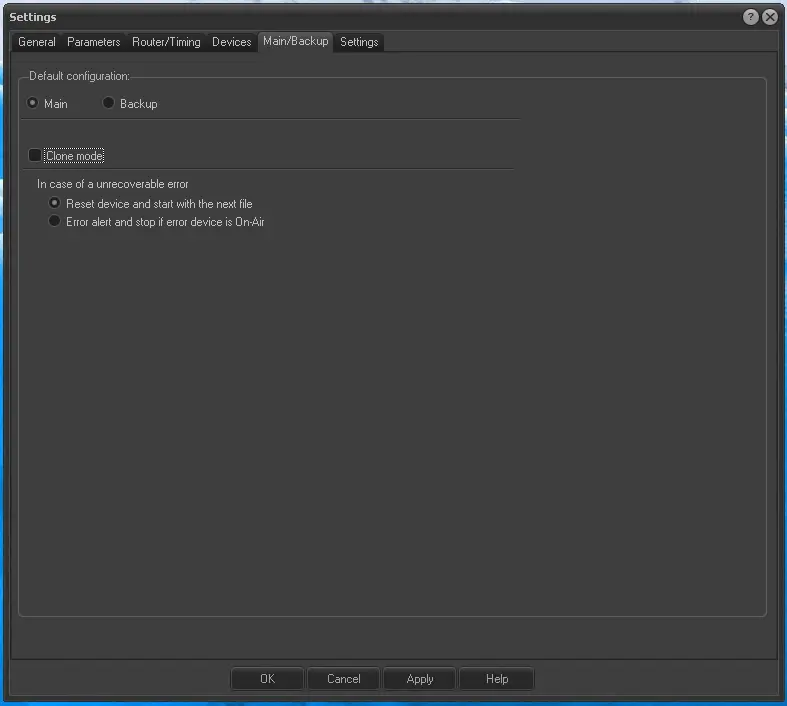
Enable the primary mode on the Etere PC on which the central automation is intended to run; the sole parameters to set in this case are related to what to do "in case of unrecoverable error":
Reset the device and restart with the following video file. To be selected when the Automation is not in master/clone mode. If the on-air channel fails, Automation will try to reset it and restart from the following event. It is to be used as a primary mode without backup.
Error alert and stop if the device in error is on air. When this option is checked, with automation not in master/clone mode, Automation will display the error and stop if the on-air channel fails. It will be used with a primary/backup mode on Main Automation.
Backup Mode
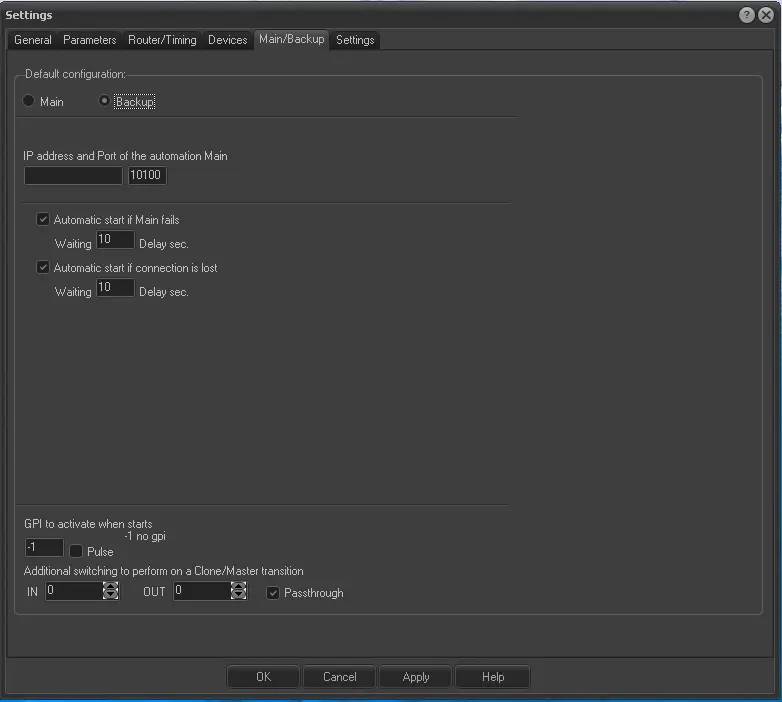
In case the Etere PC is intended to be used as a backup automation, enable the backup mode and set the following information:
Backup_Mode
IP address and Port of the automation Main - Set the IP Address and the port of the Main Automation.
Automatic start if Main fails - When this option is checked, in case the Main signals an error, Backup will wait for the time given (waits xx seconds from the signalling) for Main to correct the error. If the error cannot be rectified, the Backup starts.
Automatic start if a connection is lost - When this option is checked, in case the Backup fails, the connection with Main waits for the time given (waits xx seconds from the signalling) to restore the connection. After which, the Backup starts. The lost connection includes stoppage or breakdown of the Main PC, breakdown of network adapters or network wires, etc.
GPI to activate when starts -If enabled (values different from "-1"), the specified GPI output will trigger a level or pulse signal (depending on the checkbox status) every time the backup automation starts up.
NB: This function requires a GPI board enabled for automation use.
Additional switching to perform on a Clone/Master transition - This parameter allows specifying an additional routing switch required when a primary/backup transition occurs:
Disabled - If disabled (IN=0; OUT=0), no additional switches are performed on a Main/Backup switch.
Enabled - If enabled, every time this automation PC becomes Master (e.g. when the [AU_Command_10_b Master/backup] button is pressed), an additional switch (e.g. IN 3 to OUT 7) will be automatically performed according to the "Pass-through" option:
▪Pass-through enabled (default): The ETX Master Control will pass the switching request to the router, which will perform the switch.
▪Pass-through disabled: The switch will be generally performed on the routing device controlled by this automation PC (e.g. MTX Master Control).
Enabling an additional switch is useful when one physical router is used for both main and backup automation; it will act as a "virtual changeover" that routes to the uplink output the correct input channel every time a "backup->main transition" is performed.
 Main_Mode
 Backup_Mode