84.2.4.29 Secondary Events Planning - Duration/type based planning
The "By duration and type" section allows to plan secondary events according to the properties (duration and/or types) of the events present in the broadcast playlist, thus permitting, for example, to plan secondary events across all "commercials" lasting between "00:30 and 00:59 seconds". This tab is constituted by 2 sections where all configurations are sequentially made:
• Scheduling rules: The criteria (i.e. durations, types, protected intervals) to be considered when applying the plan.
• Secondary events: Add and organize the secondary events (logos, passthru, switches, etc) intended to be planned.
Managing plans
In order to manage a secondary events plan just create a new plan, open an existing plan or duplicate the current plan, then, it will be enough to follow the procedure described in the following steps:
1. Assigning rules
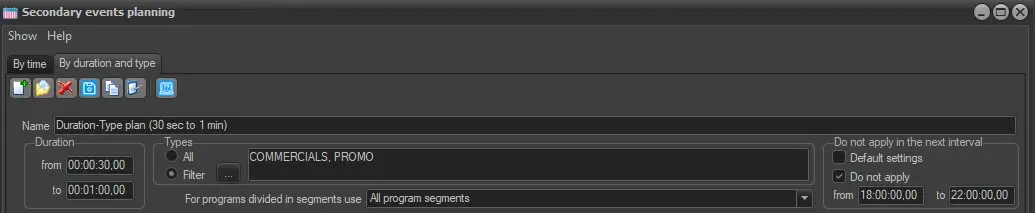
Enter a descriptive name for the plan in question and compile the following parameters:
Assigning_rules_duration_type
Duration - Set the interval within which events lengths (e.g. between 30s and 1 min) should be included, in order to be considered for the planning of secondary events.
Types - Indicate the event types (e.g. commercials) for which secondary events will be exclusively planned.
For programs divided in segments use - Select the action to be taken in case of programs containing break points:
• All program segments: The secondary event will be assigned to all segments.
• Only the first segment: The secondary event will be assigned only to the first segment.
• All segments but first one: The secondary event will be assigned to all segments except the first one.
Please note that in case it is required to associate one secondary event to the first segment and another different one to the rest of segments it will be enough to create two different plans, one for the first segments and another one for the rest of segments (i.e. all but first one).
Do not apply in the next interval - Specify the protected time slots for which the plan won't be applied. Available options include:
• Default settings: specified in the [Settings] section (under the "do not apply effects in the interval..." parameter).
• Do not apply from a custom start-time (e.g. 18:00:00) to a custom end-time (e.g. 22:00:00).
2. Secondary Events Selection
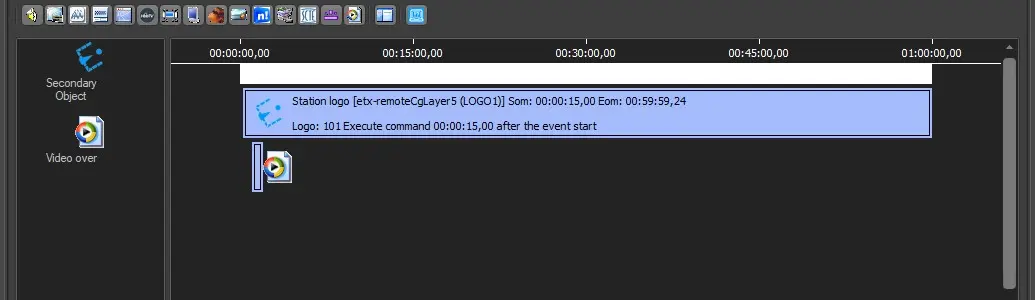
Add all the secondary events that will form part of the plan, further information on how to configure secondary events can be found in the previous chapters.
Secondary_Events_duration_type
It's worth mentioning that secondary events can be inserted more than once to the same event depending on its duration.
3. Saving the plan
Once all configurations have been defined, just press the Save button to store the plan in the database. In order to apply all planned secondary events to events matching the planning criteria (i.e. duration and types) the following actions are available:
Automatically - Planned secondary events will be automatically applied every time a schedule is published only If the "Insert secondary events in any EE publication" parameter is enabled in Etere Configuration.
Manually - Planned secondary events can be manually applied to an open schedule by using the "Apply Secondary events as defaults" function from Executive Editor.
 assigning_rules_duration_type
 secondary_events_duration_type