85.2.4.4 Sending images to watchfolders
This chapter explains how to configure Etere STMan to link an image to an Media Library and then copy it (if not already present) to a certain directory (e.g. a watchfolder from where a Dekocast system take/load images) such in a way that the image in question (e.g. an album or artist picture) will be displayed along with the main titling information (e.g. song title, song performer, production house, etc).
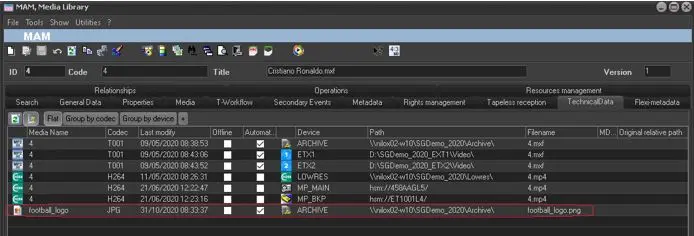
1. Before start configuring Etere STMan, make sure that assets for which the channel branding will be used counts under their asset's technical data with the image file:
Stman channel branding
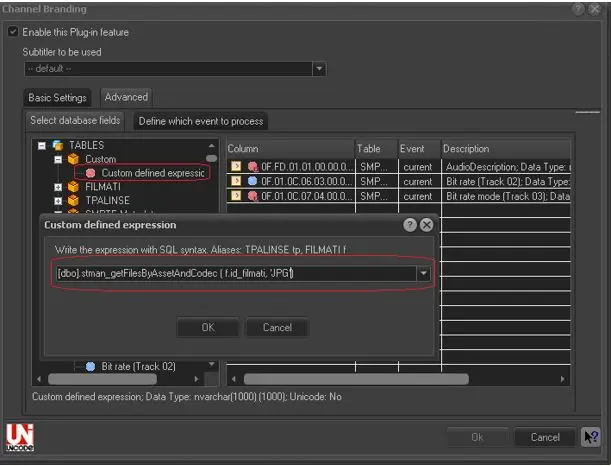
2. Configure a "Custom Field" option using the "[dbo].stman_getFilesByAssetAndCodec (f.id_filmati,'????')" function which returns the asset's linked files matching a certain codec:
Custom Field
NB: The ???? symbols must be replaced with the codec of the media file (e.g. JPG)
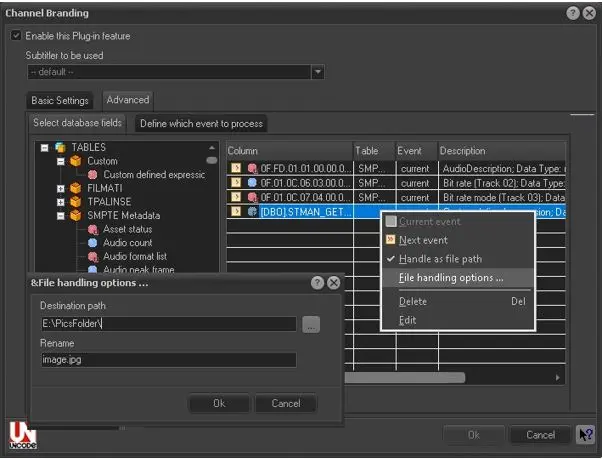
3. Make right-click on the custom database field and select to "handle it as a file path" to indicate to the system that this field contains the name of a file. Then, set its "File handling options" (i.e. for the file transferring and renaming):
File handling options
NB: Please make sure that the selected destination path is reachable by the Etere STMan (i.e. the windows user currently logged in the server where Etere STMan runs must be allowed to write on that folder), otherwise, the channel branding could fail due to a network timeout error.
4. At this point, the channel branding is ready to be used without need to change the CTM file (i.e. add the new field) used to sent to the graphic device the channel branding.
 5158_Stman_channel_branding
 5157_Custom_Field
 5156_File_handling_options