59.3.9.107 Subtitles translation via Google Translate
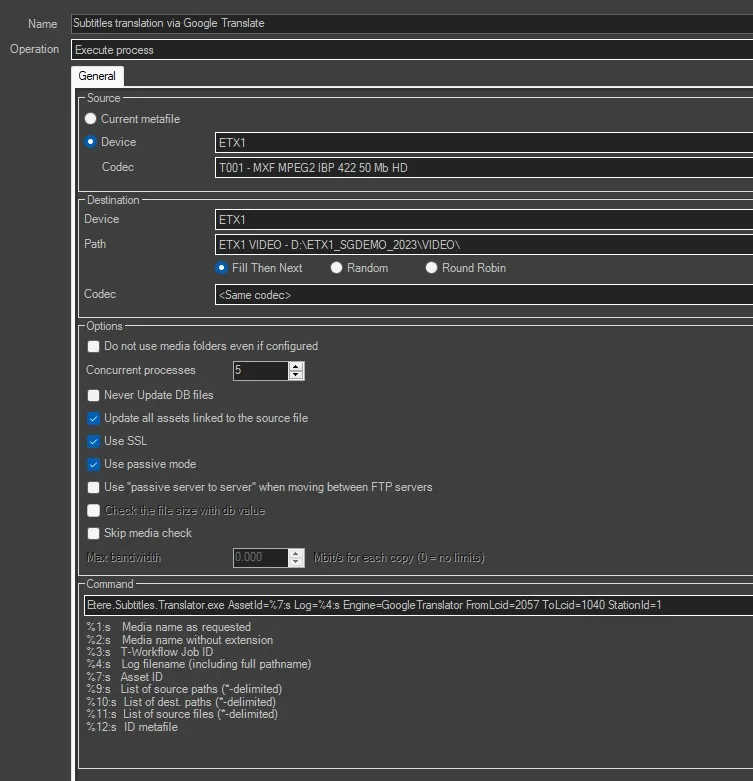
This action allows to translate the subtitles associated to an asset from a language to another one. To execute the translation, Etere Service Media Manager will launch the deidcated executable, specified in the command line.
Note: Both the source and destination languages must be enabled in Etere Configuration > Settings in both Languages and Subtitles tab.
subtitles_translation_action
Name: Give the action a brief, self-descriptive name.
Operation: Leave "Execute process" as default.
Source: Choose the device and codec of the metafile which the subtitles are linked to, or leave "Current metafile" if the action of the same name will be used to select the metafile.
Destination: Specify the destination device, path and codec of the metafile.
Command: By default this field is already compiled with a command line, which contains:
- The executable file which will process the translation
- The source language's LCID
- The destination language's LCID
- The number of the station in use
Etere.Subtitles.Translator.exe AssetId=%7:s Log=%4:s Engine=GoogleTranslator FromLcid=2057 ToLcid=1040 StationId=1
The command line contains other attributes as well, and the user can add any of the wildcards specyfied at the bottom, acconrding to the needs.
 subtitles_translation_action