204.3.1.1 Usage
Save Logs
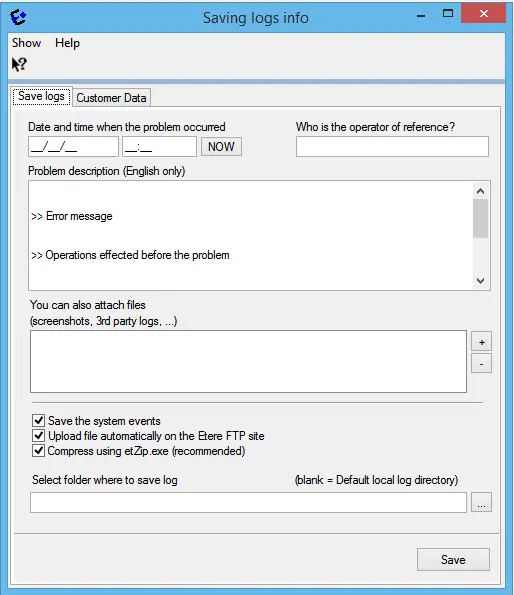
The main form for saving logs allows to notify to the Etere customers support team about a problem arisen when using an Etere application, in this section it is possible to define the following fields:
Logs_logtools_savelogs
Field - Date and time
Description : Indicate the exact date and time at which the problem occurred.
Field - Operator
Description : Specify the station's person who was using the application at the time of the incident.
Field - Description
Description : Provide a concise description of what happened before and during the problem (e.g.: "When I manually change the duration of a scheduled event..."
Field - Attached files
Description : Browse and select all files that you retain can be useful to the support team on analyzing the problem.
Field - Save the system events
Description : If checked, EventView.xml and EvWrDump.xsl files will be generated and included in the log packet.
Field - Upload file automatically on the Etere FTP site
If enabled, the created log file (.zip) will be automatically send to the Etere's support team.
NB: Please note that the FTP address can be changed by modifying the ftputils.ini file located in the Etere local installation (c:\Program Files\Etere).
Field - Compress using etzip.exe (recommended)
Description : If checked (default), a separate process (etzip.exe) will be used to create the system dump, retrieve the SysInfo and compress the logs file, thus preventing internal issues that may cause the interruption of the save operation by "Save Logs".
If unchecked, logs will be compressed internally by the "Save Logs" application.
Once the [Ok] button is pressed, all log information and attached files are compressed into a single zip file and saved in the Etere local installation directory (i.e. C:\program files\Etere\Log\Saved) using the following format:
[ModuleName], [UserName], [PCName], [Date-time].zip (where date=yymmdd, time=hhmmss)
For instance, the log below refers to a problem arisen on the station 001, when the operator Michael was running the EtereAutomation module in the PlayoutPC (which systemID is 17935) , this, on 2011-01-25 at the 11-47-49:
etereau, u001, michael@playoutpc, 110125-114749.zip
au.etereau.000.michael.exceptions.log - 1'084'150 bytes
au.journal.appEvents.log - 14'43 bytes
au.journal.exceptions.log - 4'613 bytes
When the log file is created, operator can send the log file to Etere Support for investigation of specific issue but he/she cannot view the log data. Only user with administrator rights is allowed to view the content in log file.
NB: From Etere version 31.1 onwards, the root directory name and user name would be excluded from zipped log file name.
Note:
Logs which are "open write" (i.e. currently being written by Etere) will be first copied into a temporary file named exactly as the log plus an appended suffix that indicates their current open-write status:
mtx.serviceapp.etwin32interop.000.exceptions.log - 6'448 bytes
mtx.master.1.xmatrox.log[ow] - 4'971'208 bytes
mtx.master.1.master.log[ow] - 204'364 bytes
mtx.master.1.log[ow] - 4'425'086 bytes
mtx.master.1.log[ow] - 141'287 bytes
As shown in the example above, logs including an [ow] suffix are common logs exported while they was being used by another Etere application; being important to notice that they can be either directly opened (using a text editor) or renamed (into a .log extension).
Customer Data
Logs_logtools_customdata
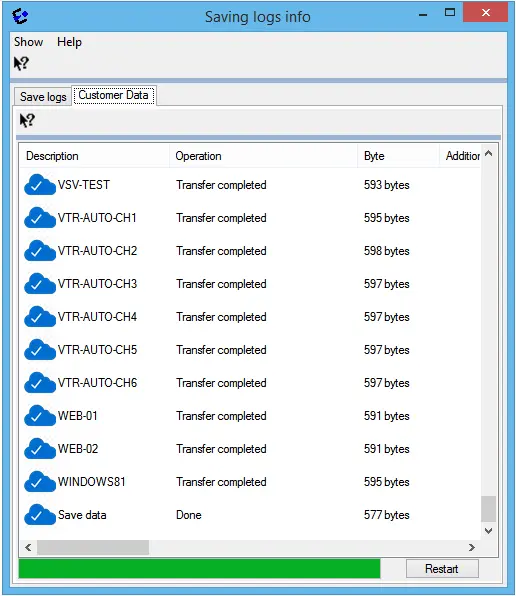
The Customer Data tab containing all customer respective log files depository which can be exported upon request by customer to Etere Singapore through the web service:
1.Customer login to Etere Web with a valid customer code and password.
2.Customer can submit a request to Etere to export respective log file. Etere would responds to the request with a Job ID (ID_DataSnapshot).
3.Customer would need to submit the checksum value encrypted in the requested file during the depository, if the checksum matched, a copy of the requested file would be linked to the Job ID.
4.If there are variation, customer would sent the new checksum to be deposit into the database.
5.All above steps are to be performed when requests make from each workstation.
 Logs_logtools_savelogs
 Logs_logtools_customdata