201.15.3 Scheduling Music Formats
When the blocks are programmed for using music formats and a schedule grid structure has been prepared, the next step consist in opening Strategic Editor on a certain date, a schedule containing all the predefined segments of the selected day will be opened. At this point,you can start scheduling the music events.
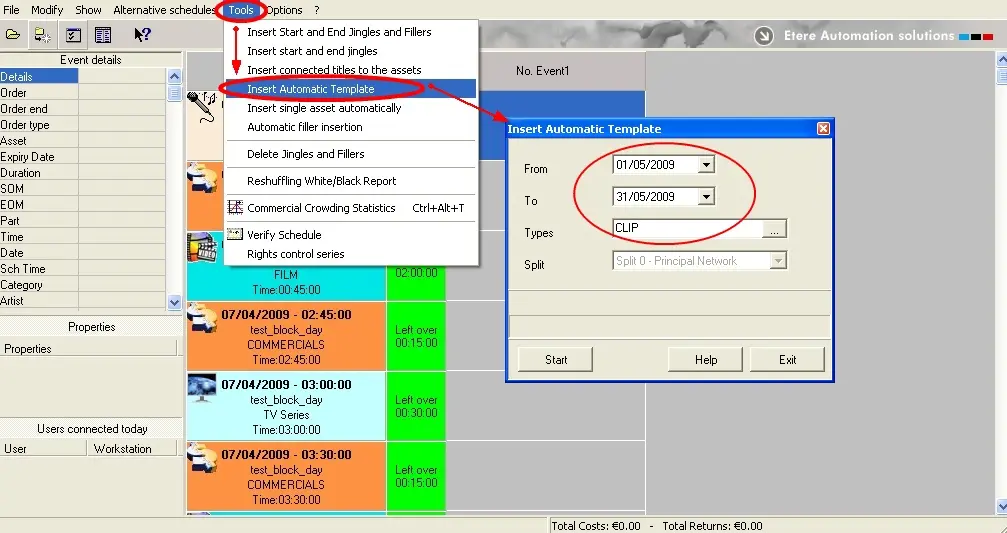
•Insert automatic templates: It allows automatically (based on the user-defined music formats and blocks) schedule the entire daily program with certain time interval (e.g. week-scheduling, month-scheduling or even annual-scheduling). From the tools menu, select the 'Insert automatic template' function and a simple form will be prompted, select the time schedule interval (from data - to data) and the segment types to where it would be applied. For instance, the figure below illustrates how to perform an automatic monthly scheduling for all the segments which type is Clip:
Musicformat_presentationeditor3
Each time an event is scheduling using this function, the scheduling engine perform the following procedure:
1. Filter all events by music format
2. Exclude all events with a "minimum artist"
3. Exclude all events with a "minimum track"
4. Narrow the list to the assets with the highest "asset priority"
5. Narrow the list to the assets with the highest "track priority"
6. Select the event to be scheduled randomly.
 Musicformat_presentationeditor3