59.6.2.144 GPIV Board - GPIV resource editor
The information displayed in the first part is merely descriptive and shows previously assigned data:
•Code: the path of the resource that you are editing is displayed
•Type: shows the resource type
•Number: indicates the ordinal number that identifies that resource in case others of the same type coexist.
The user must enter the following information:
•Name: description of the resource you are editing.
•Driver: ETGPIO, SEALEVEL, QUANCOM
•Remote PC data: if you want to send a string to a remote PC, a string representing the GPI status, enter here its IP address and Local Port (example. IP address = 198.120.254.120 / Local Port = 6000); otherwise, leave these fields blank.
NB.: The boards SEALEVEL and QUANCOM are USB-connected, and before connecting them, you must first install the driver from the CD.
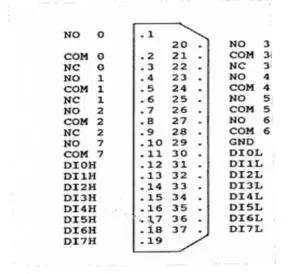
Connection to Advantech PCL-725 card
NOTICE: The Advantech PCL-725 card has a 37-pin D-type connector accessible from the rear plate. The diagram below shows its pin assignments.
Legend:
✓DInL - low digital input, n channel
✓DInH - high digital input, n channel
✓GND - ground
✓NC n - close pin of n relay
✓NO n - open pin of n relay
✓COM n - common pin of n relay
3788_Connection_to_Advantech_PCL-725_card
Connection to AR-B2001
INPUT (3E0) DB37 FEMALE
BIT 0 PIN 1-3 PIN 1-2
1 5-7 3-4
2 9-11 5-6
3 13-15 7-8
4 17-19 9-10
5 21-23 11-12
6 25-27 13-14
7 29-31 15-16
8 2-4 20-21
9 6-8 22-23
10 10-12 24-25
11 14-16 26-27
12 18-20 28-29
13 22-24 30-31
14 26-28 32-33
15 30-32 34-35
DIP SWITCH configuration inside the card:
12345678
SK INP = XXX on
XXXXX off
Connection to AR-B2102
OUTPUT (380) DB37 FEMALE
BIT 0 PIN 1-3 PIN 1-2
1 5-7 3-4
2 9-11 5-6
3 13-15 7-8
4 17-19 9-10
5 21-23 11-12
6 25-27 13-14
7 29-31 15-16
8 2-4 20-21
9 6-8 22-23
10 10-12 24-25
11 14-16 26-27
12 18-20 28-29
13 22-24 30-31
14 26-28 32-33
15 30-32 34-35
DIP SWITCH configuration inside the card:
12345678
SK OUT = XXXXX on
XXX off
Connection to Advantech PCL-730 card
NOTICE: The Advantech PCL-730 card has a 37-pin D-type connector accessible from the rear plate. The diagram below shows its pin assignments.
Abbreviations:
DO - Digital output
DI - Digital input
D.GND - Digital ground
IDO - Isolated digital output
IDI - Isolated digital input
EO.GND - External ground for isolated output
EI.COM - External common Vcc /GND for isolated input IDI0~IDI15
EI.COM1 - External common Vcc /GND for isolated input IDI0~IDI7
EI.COM2 - External common Vcc /GND for isolated input IDI8~IDI15
EO.COM - Free wheeling common diode for isolated output IDO0~IDO15
EO.COM1 - Free wheeling common diode for isolated output IDO0~IDO7
EO.COM2 - Free wheeling common diode for isolated output IDO8~IDO15
GPIV resource editor - User
Indicate which user and which software the resource has to be installed for.
•logic GPI: indicate how to consider the 8 GPIs in the program (if from 1 to 8, from 9 to 16, etc.)
•Usable bits: If it's necessary only to use some 8 bits, this may be because another program uses the others. It's possible to define which 8 bits (gpi) can be used. This possibility can be useful if AUTOMATION and SPLIT, which share the same GPI card, cohabit on the same PC. It is also useful if one wants to use the bits from 1 to 4 for AUTOMATION and the bits from 5 to 8 for SPLIT. (WARNING: not all the modules keep account of that parameter. Only AUTOMATION currently keeps count of it).
(If what is mentioned above is not a necessity, start all the bits as default)
 Connection_to_Advantech_PCL-725_card