208.5.1.2 EDT Configuration
The EDT protocol has been fully integrated with the most important modules for data transferring; it is possible to use EDT from the following modules:
Description:
Etere module - FTP Server
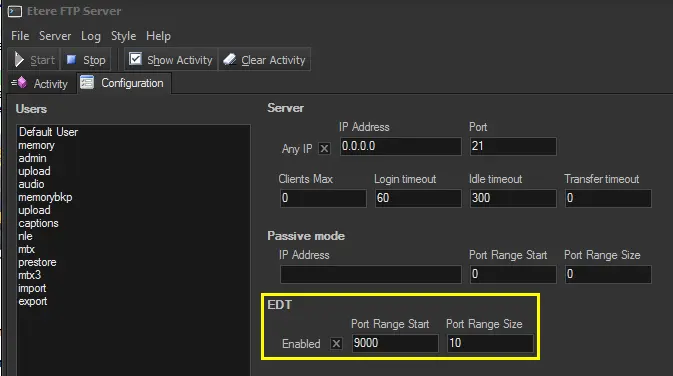
Description: The Etere FTP Server supports EDT for custom sharing and faster transfers via FTP:
FTP Edit
Please refer to the FTP ServerclickHere chapter for detailed information on enabling the EDT protocol.
Etere module - DataMover
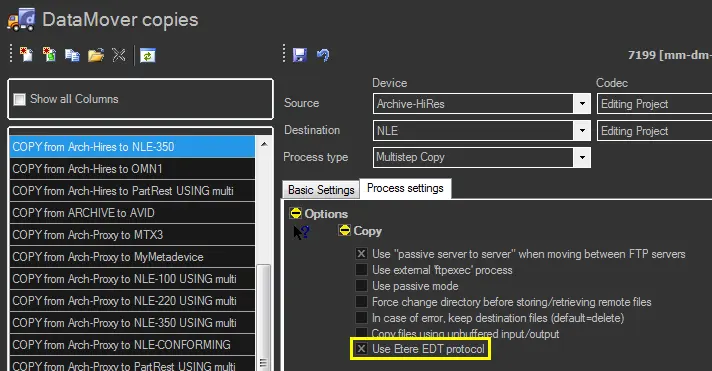
Description: The Etere DataMover supports EDT for multistep copy actions powered with concurrent processing and separated agents:
DataMover copies
Please refer to the DataMover chapter for detailed information on enabling the EDT protocol.
NB: To ensure a smooth data transfer, create a DWORD key "FastSendDatagramThreshold" in Windows Registry [HKEY_LOCAL_MACHINE \ SYSTEM \ CurrentControlSet \ Services \ AFD \ Parameters] and set the decimal value to "1500".
Note:
❑It is important to note that EDT requires the Etere.EdtApi.dll and Etere.EdtCore.dll files to be present in the Etere's installation directory of the computer(s) on which DataMover/FTPServer is installed.
❑The Etere Update workstation module needs to be launched -at least once before using it- on said workstation(s) to automatically execute the Etere MM Workstation Setup (i.e. EtereMmUpdWks.exe) application for tuning the operative system to support EDT.
 FTP_Edit
 DataMover_copies