Create ETX-G Current Event and Next Event Templates
66.8.3 Scheduling Current Event and Next Event via STMan
This chapter describe the steps to associate the previously created “Current Event” and “Next Event” templates to primary events in Automation using Etere STMan.
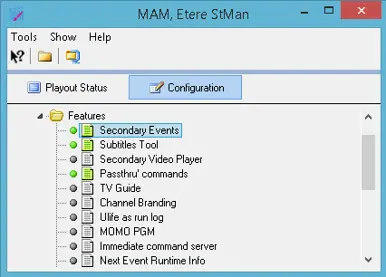
- Launch Etere STMan, select “Secondary Events” plug-in feature and click on <Configuration> to open the configuration wizard.
Stman_secondary_events_feature
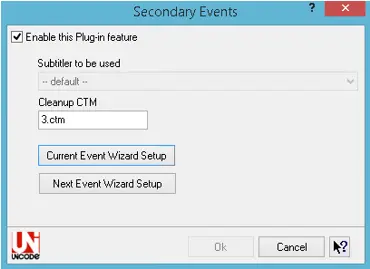
- Next, enable the option “Enable this Plug-in feature” and start configuring the settings for “Current Event Wizard Setup” and “Next Event Wizard Setup”
Stman_secondary_events_wizard
- Select the subtitler and cleanup CTM to be used.
- Click on “Current Event Wizard Setup” to launch the configuration wizard.
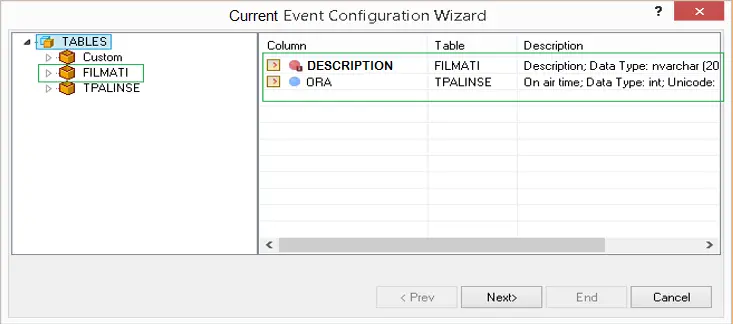
Stman_secondary_events_current_table
In Database Tables, select the database field to be fetched and listed in the Current Event ticker. In the example above, database fields “Description” for asset title/description and “ORA” field for asset scheduled time has been selected. - Follow the instruction on screen to complete the configuration wizard for “Current Event” setup.
- Click on “Next Event Wizard Setup” and repeat step 4 & 5 to complete the setup for “Next Event” template.
 Stman_secondary_events_feature
 Stman_secondary_events_wizard
 Stman_secondary_events_current_table