59.8.2.1 Space monitor
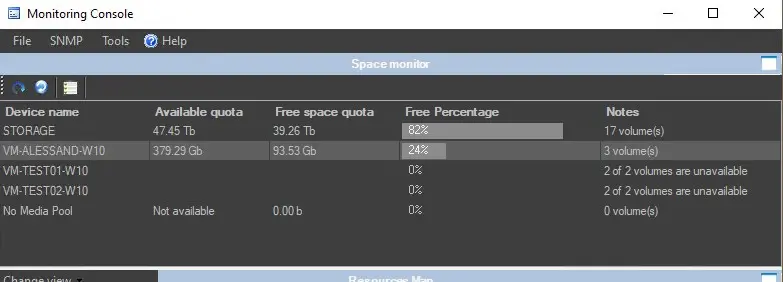
The "Space Monitor" tool, available by default in the upper part of the window, allows operators to view the storage space of all devices for which storage paths are defined (e.g. video servers, workstations, servers, etc).
space_monitor
As shown in the figure above, the "Space Monitor" tool consists of a list containing all storage devices (video servers, archives, computers) configured for storage calculation, displaying for each device the following information:
Device name: The name of the device monitored.
Available quota: The total space (free and used) in the device expressed in byte units.
Free space quota: The free space in the device is represented in byte units.
Free percentage: The free space in the device is expressed in percentage.
Notes: The number of volumes in the resource. It also displays the number of unavailable volumes in the total.
Please refer to Configuration > Settings > Device Settings > Cloud-device chapter on configuring the maximum meta device space to be monitored in the Monitoring Console.
If the colour of your skin in the "Available free space" column is unpresentable, you can enhance the colour by modifying the skin settings in Etere Skin.
In an environment with memory-intensive applications, you can set up a custom paging file to offload the data processing in RAM (random access memory) and increase data processing speed.
Please note: The Space Monitor feature monitors the available space in each storage device as a whole; it does not monitor the volumes within the storage device.
NB: Depending on each resource, the total and available space amount will be expressed in either time (e.g. 21:57:46.00) or byte (e.g. 746.90 Gb) units.
Automatic send email when storage threshold is reached
You can configure an automated emailing process in the workflow to send emails to responsible parties when the storage gets the percentage of threshold (e.g. 80%) set in the "Used space threshold" option.
Please refer to the topic "Create an email profile in SQL Server" in the Etere Configuration manual for Database Mail service configuration.
Other storage monitoring features
It's worth mentioning that the Monitoring Console counts with other tools for monitoring the storage space of devices, which include:
Devices space cleanup
Database space monitor
 space_monitor