79.4.8.1 Stories Basket
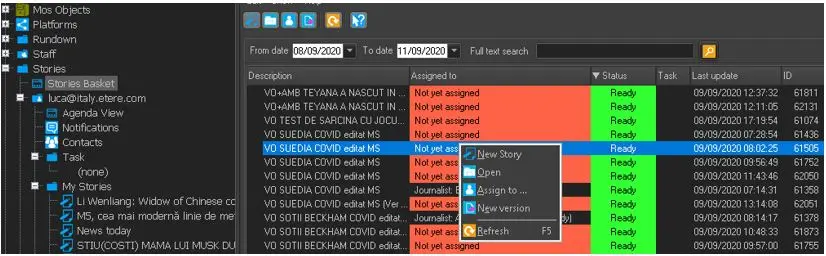
The Stories Basket is the database where all stories are stored. You can search for existing stories, create new story, edit stories, create new version of story, or assign story to journalists.
4743_Stories_Basket
Functions available in Stories Basket includes:
- From date - To date: You can search for stories within the specific date range to view all stories scheduled in the Rundown, or stories created within the dates. By default, the current date would be searched.
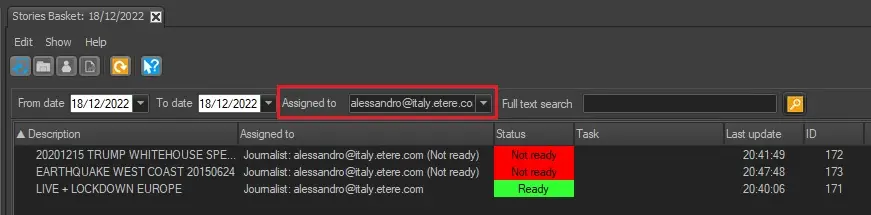
- Assigned to: Filter the stories by the person who they're assigned to.
- Full text search: Search the stories by filtering the story titles, story text or keywords in the stories. For example:
- Search multiple words using the AND operator, e.g. enter "stories" and "nomination" to filter stories containing "stories" and "nomination" in it.
- Search for phrase in stories using the quotation marks, e.g. "stories nomination".
- Search for stories with quotation mark and asterisk. e.g. "nomination * ".
- Combination of the above.
- New Story: Create a new story. Please see Stories Management for details information.
- Open: This function open the selected story in Story Editor.
- Assign to: This function assign the selected story to a journalist. Other than Journalist, you could also assign the story to any user group that defined under the Roles categories in Configuration Editor.
- New version: This function copy the story and create a duplicate story in the basket. It opens the Story Editor where you can change the title of the duplicated story and assign story to another journalist.
- Refresh (F5): This function update the stories view in Stories Basket.
- Drag-and-drop: You can select stories and drop into the Rundown, or drag from Rundown and drop into another Rundown. The story would be dropped after the selected row in the Rundown. If the story already exist in the destination Rundown, a warning message would prompt. You must respond appropriately to the warning message to proceed with the copy function.
WARNING: If the Full-text search remain in dormant frequently, you can perform a “Full-text Search” system maintenance task to overcome the dormant situation.
4744_Warning_message
When all stories are retrieved, you can click on the columns to sort the stories by its story title, story assigned to, and the status of the assigned story. In the Task column, the story highlighted in yellow indicate that the task has been undertake by the journalist.
The readiness of the Story in displayed in the Status column. If a “Ready” story is been edit by user in Story Editor, the status of the story would change from “Ready” to “Not ready” to notify the operator.
WARNING: The maximum number of stories can be loaded at any one time is limited to 400.
 Stories_Basket
 Warning_message
 assigned_to_filter